


Managing API credentials, usage limits, and account activity should be straightforward. FMP updated the user dashboard to make API keys, daily usage, endpoint access, developer tools, and account navigation easier to find from one central screen.
The updated dashboard gives users a cleaner way to monitor account and API activity as they move from first setup to more repeatable API workflows. Instead of searching through separate menus for key account details, users can now review usage, copy credentials, check available datasets, and access documentation more quickly.
Key Takeaways
- The updated dashboard gives users clearer visibility into API usage and bandwidth.
- API keys, documentation, the API viewer, and support links are easier to access from the main screen.
- The Market Data tab helps users check which datasets are available on their current plan.
- Changelog visibility makes it easier to stay aware of product updates, route changes, and documentation improvements.
Tracking API Usage and Bandwidth Visibility
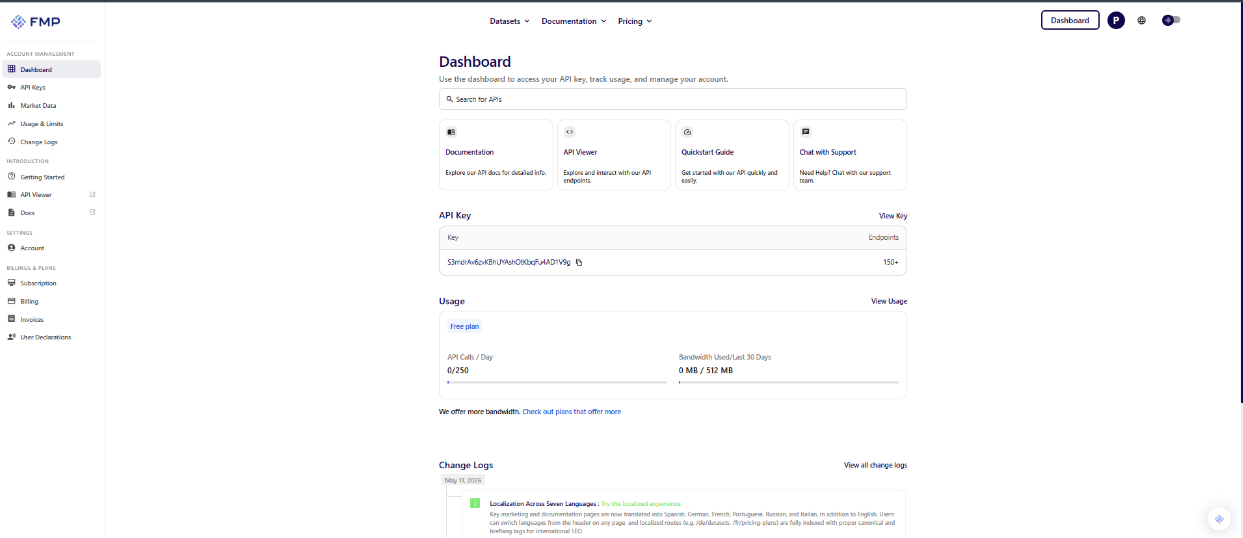
Users need a clear view of current API usage before running new data pulls. The updated dashboard places a dedicated usage block directly below the primary API key, making account activity easier to review immediately after login.
Two progress bars show daily API calls and bandwidth used over the last thirty days. This helps users understand how close they are to current plan limits, including the 250-call daily limit for free-plan testing. Seeing usage and bandwidth in the same place makes it easier to avoid surprises and decide when a plan change may be needed.
Monitoring usage directly from the main dashboard removes guesswork from day-to-day API management. Users can quickly check remaining usage without navigating through separate billing or account pages.
Verifying Endpoint Availability by Plan
Endpoint access is easier to manage when users can see which datasets are available before planning a project. The updated Market Data tab helps users check which datasets are available on their current plan and which may require an upgrade.
This reduces trial and error when selecting endpoints for a project. For example, users can verify access to datasets such as company profile data before building a workflow around that endpoint.
Clear endpoint visibility helps users plan their next API request with better context. Instead of discovering access limits only after testing a request, users can check plan access information directly inside the dashboard.
Improving Access to Developer Tools
The updated dashboard also makes it easier for users to reach core developer tools. Four top-level action cards help users find documentation, open the API viewer, access support, and move into common setup paths without searching through nested menus.
The primary API key sits in a dedicated container with a simple copy function. Users who are still getting started can follow the developer quickstart guide to understand how to add their key to a request and begin testing endpoints.
The left-hand sidebar also separates core account tools from settings, billing, documentation, and support areas. This keeps everyday navigation cleaner for users who need to move between account management and API setup.
Staying Aware of Platform Updates
Financial datasets, endpoint routes, and documentation can evolve over time. The updated dashboard makes recent platform updates and changelog items more visible, helping users stay aware of product changes, new routes, and documentation updates.
A live changelog feed appears near the bottom of the main dashboard. Users can also open the full FMP changelog to review the complete history of platform updates.
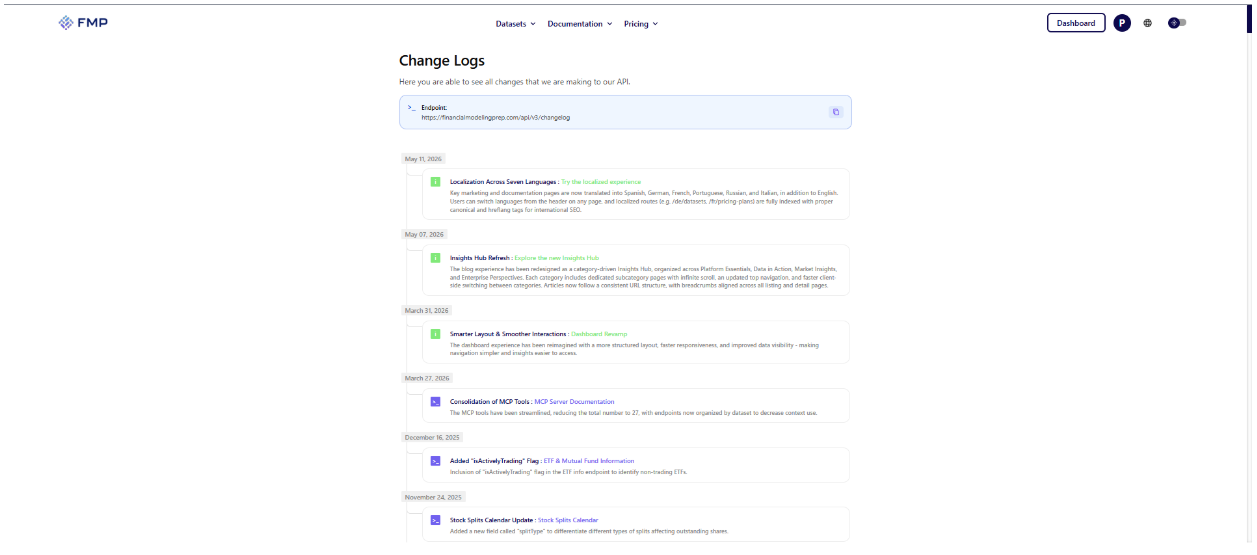
Keeping changelog visibility inside the dashboard makes it easier to stay informed without relying only on outside announcements. Users can review new features, route changes, documentation updates, and other platform improvements as they are released.
A Cleaner Path Forward
The updated FMP dashboard reduces friction by putting essential account metrics and developer tools in one place. Users can monitor API usage, review bandwidth, copy their API key, check available datasets, and navigate to support or documentation from a cleaner interface.
This update is especially useful for developers, analysts, account owners, and self-serve users who are moving from early testing into more consistent API workflows. Users can log in to the updated dashboard to review current usage, check available datasets, and access key developer tools from one place.
Frequently Asked Questions
What is the primary function of the updated FMP dashboard?
The updated dashboard gives users a central place to manage API keys, track usage limits, review bandwidth, check endpoint access, and access developer tools.
Where do I find my active API key?
Your API key appears in a dedicated section on the main dashboard. Use the copy icon next to the key to paste it into your local application or API request.
How do I check my daily request limit?
The Usage section appears directly below your API key. It shows your current API call count against your daily limit, along with bandwidth usage over the last thirty days.
How does the Market Data tab work?
The Market Data tab shows which datasets are available on your current plan and which may require an upgrade. This helps you understand endpoint access before building a project around a specific dataset.
Where can I test a specific endpoint?
Use the API Viewer card on the main dashboard. The API Viewer lets you test requests and review the response directly in your browser.
Where are platform updates announced?
Recent platform updates appear in the dashboard changelog feed. You can also view the full changelog from the sidebar or by visiting the FMP changelog page.