


Choosing a Financial Modeling Prep plan starts with a simple question: what are you trying to build?
A user testing a few endpoints does not need the same access as someone running a dashboard, refreshing market data, pulling fundamentals across hundreds of symbols, or supporting a production app. The right plan depends on how your workflow uses the data, not just which tier has the longest feature list.
Before choosing a plan, think through the basics: which endpoints you need, how many symbols you'll query, how often the data needs to refresh, how much history matters, and whether the workflow is for one person, a team, or an external product.
This article walks through how to evaluate those needs before you commit to a plan.
Key Takeaways
- Start with the workflow you need to support.
- Estimate your endpoints, symbols, refresh cadence, historical depth, and dataset needs before comparing plans.
- Free access is useful for testing endpoints, checking response formats, validating symbols, and exploring basic data availability.
- Paid plans make sense when you need deeper history, broader endpoint access, higher usage limits, or repeatable workflows.
- Team, production, bulk, or app-based workflows may require higher tiers or sales support.
When Free Access Is Enough for Testing
Free access is useful when you are still figuring out whether FMP has the data structure your project needs.
At this stage, you may only need to test API keys, check JSON response formats, confirm ticker symbols, explore basic company data, or make a few single-company requests. The goal is not to scale yet. It is to see whether the data fits your workflow.
The Basic plan includes 250 calls per day, end-of-day historical data, profile and reference data, and access to more than 150 endpoints. You can also register for a free plan without a credit card, which makes it easier to test the platform before making a plan decision.
For example, if you are starting with company-level reference data, the Company Profile API dataset is a useful first endpoint to test. It lets you check ticker formatting, industry classifications, company identifiers, and response structure before you build a larger workflow around the data.
Free access is not meant for every use case. If you need market-wide comparisons, long-range backtesting, multi-company modeling, frequent refreshes, or scalable workflows, you will likely need to compare paid plan options.
If you are still in the evaluation stage, you can start by testing the endpoints you need and confirming whether the data matches your workflow before committing to a paid plan.
Choosing a Plan for Financial Modeling and Fundamental Analysis
Once you move from testing endpoints to building a real model or recurring workflow, historical depth starts to matter more.
A simple company review may only need a recent snapshot. A valuation model, financial dashboard, recurring report, or screening workflow may need several years of income statements, balance sheets, cash flow statements, ratios, and key metrics.
The Starter plan includes up to five years of historical data, US coverage, annual fundamentals and ratios, historical stock price data, financial market news, crypto, and forex. That can support many early modeling, reporting, and screening workflows.
The Premium plan extends historical depth to up to thirty years and adds broader fundamentals and ratios, intraday charts, technical indicators, corporate calendars, and UK and Canada coverage. That may be a better fit if your workflow depends on longer company histories, deeper comparisons, or broader market context.
A simple way to think about it:
- If you are only testing endpoints, free access may be enough.
- If you need recurring fundamentals or multi-year statements, a paid plan may fit better.
- If you need deeper history, broader coverage, intraday data, or more advanced endpoints, a higher tier may make more sense.
If your workflow depends on filing-based statement data, the As Reported Financial Statements API is worth checking early. If you are not sure which datasets to test first, start with the data most directly tied to your workflow, such as company profiles, financial statements, historical prices, or estimates.
Choosing a Plan for Dashboards, Apps, and Scheduled Jobs
Dashboards, apps, and scheduled workflows need more than endpoint access. They also need enough capacity to support how often the data refreshes and how many symbols the workflow touches.
A dashboard that updates once a day has different needs than an app making repeated requests during market hours. A small screener has different needs than a scheduled job pulling prices, fundamentals, analyst data, or historical records across a larger universe.
The Starter plan includes 300 API calls per minute. Premium increases that to 750 API calls per minute, and Ultimate includes 3,000 API calls per minute.
Higher tiers may make sense when your workflow supports larger symbol lists, more frequent refreshes, more users, or production processes that cannot depend on low-volume access.
Dataset availability matters too. Some datasets are available across all tiers. Others are partial on Free or Starter and broader on Premium or Ultimate. Before choosing a plan, check whether your workflow needs fundamentals, intraday prices, analyst data, ETF holdings, ownership data, transcripts, technical indicators, bulk delivery, or batch endpoints. The pricing page is the right place to compare those plan differences before you build around a specific dataset.
For market data workflows, the Historical Price API is a common place to start. For forecast-driven models or dashboards, the Financial Estimates API can help connect analyst expectations with forward-looking assumptions.
The upgrade decision should be practical. If you are hitting limits because the workflow is growing, a higher plan may make sense. If you are hitting limits because of duplicate calls, inefficient loops, or unnecessary refreshes, optimize the requests first.
Questions to Ask Before Choosing a Plan
Before choosing a plan, define the workflow. The right tier usually depends on the endpoints you need, how much history matters, how often the data refreshes, and whether the workflow is exploratory, repeatable, or production-dependent.
|
Question |
Why It Matters |
Plan to Compare First |
|
Am I only testing endpoints, symbols, and response formats? |
Early testing usually needs low-volume access, basic company data, and a way to confirm whether the data structure fits your workflow. |
Basic |
|
Do I need company profile, reference data, or simple end-of-day market data? |
These are common starting points for early exploration, single-company checks, and simple dashboards. |
Basic or Starter |
|
Do I need recurring fundamentals, annual statements, ratios, or historical stock prices? |
Modeling, reporting, and screening workflows usually need more historical depth and repeatable access than a basic test flow. |
Starter |
|
Do I need more than five years of history? |
Longer valuation work, trend analysis, backtesting, and multi-cycle comparisons may require deeper historical coverage. |
Premium |
|
Do I need intraday charts, technical indicators, or broader fundamentals? |
These workflows usually go beyond basic testing and standard annual fundamentals. |
Premium |
|
Do I need ETF holdings, 13F ownership data, transcripts, full historical access, bulk delivery, or batch endpoints? |
These are more advanced datasets and delivery patterns that matter for larger workflows, research systems, or production use. |
Ultimate |
|
How many symbols will I query regularly? |
A single-company workflow has very different usage needs than a screener, dashboard, or app covering a larger universe. |
Starter, Premium, or Ultimate depending on scale |
|
How often will the data refresh? |
Daily refreshes may be manageable on lower tiers. Intraday, app-based, or scheduled jobs may require higher call capacity. |
Starter, Premium, or Ultimate |
|
Will this be used by one person, a team, or an external-facing app? |
Team workflows, production systems, and user-facing applications may need higher limits, bandwidth, licensing review, or sales support. |
Ultimate or Sales |
Use this table as a starting point, not a final rule. A workflow may start on Basic while you test endpoints, move to Starter for recurring fundamentals or historical prices, and require Premium or Ultimate only when the dataset needs, history, refresh cadence, or delivery model becomes more demanding.
Before choosing, compare current endpoint availability, data depth, usage limits, and plan features on the FMP pricing page.
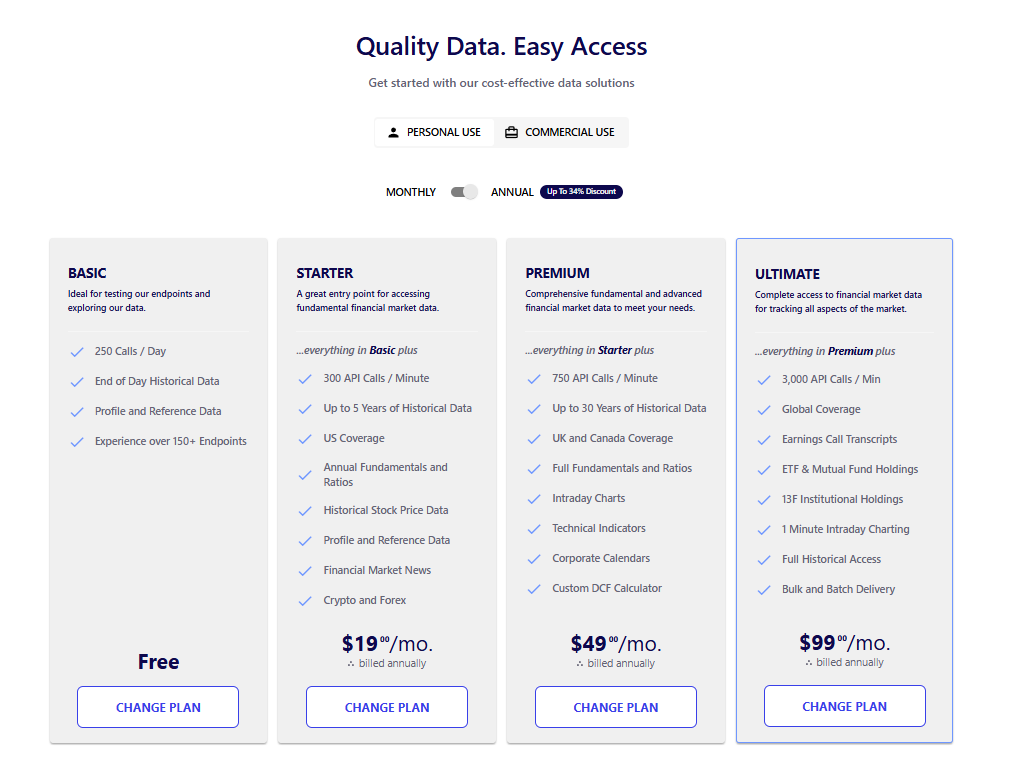
Compare current FMP plan options after defining your workflow's endpoint, usage, historical depth, and coverage needs.
Choose Based on Workflow Fit, Not Plan Size
The right FMP plan is the one that matches how your workflow actually uses data.
Free access can support early testing and exploration. Paid plans make sense when you need deeper history, broader endpoint access, higher limits, or repeatable data pulls. Higher tiers or sales support may be useful when the workflow becomes team-based, production-dependent, or built around larger-scale delivery.
The goal is not to overbuy. It is also not to stay on a plan that slows down the work. The goal is to choose the access level that fits the endpoints, history, refresh cadence, usage, and coverage your project needs.
After creating an account, it helps to make a simple first-pass plan: test a small number of endpoints, confirm the data structure, then compare your expected usage against the current plan limits. That keeps the plan decision tied to the workflow instead of guesswork.
FAQs
Which FMP plan should I start with?
Start with what you need to do. If you are testing endpoints, checking response formats, confirming symbols, or exploring basic company data, free access may be enough. If you already know you need recurring fundamentals, deeper history, larger symbol coverage, dashboards, apps, or production workflows, compare paid plans based on endpoint access, usage limits, and historical depth.
Can I try FMP before choosing a paid plan?
Yes. The Basic plan is free and includes 250 calls per day, end-of-day historical data, profile and reference data, and access to more than 150 endpoints. It is useful for testing API keys, validating response formats, and confirming whether the data fits your project. You do not need a credit card to register for a free plan.
How do I know if I need more historical data?
You may need more historical data if your workflow depends on multi-year financial statements, valuation models, trend analysis, backtesting, recurring reports, or long-range comparisons. Starter includes up to five years of historical data, while Premium includes up to thirty years. The right depth depends on what you are building.
How do I know if I need higher API limits?
You may need higher API limits if your dashboards, apps, scheduled jobs, or screeners consistently approach plan limits after you have optimized your requests. Larger symbol lists, more frequent refreshes, team workflows, and user-facing applications can all increase usage.
Should I upgrade now or optimize my requests first?
In most cases, optimize first. Check for duplicate calls, unnecessary refresh loops, and data that could be cached instead of requested repeatedly. If the workflow is already efficient and still needs more capacity because of scale, refresh cadence, or production use, a higher plan may be the next step.
When should I contact sales?
Contact sales when your workflow is team-based, production-dependent, or requires custom usage, higher bandwidth, bulk delivery, batch endpoints, redistribution rights, dedicated support, or enterprise-level access. Sales can help match the plan to how the data will actually be used.