


Bulk fundamentals workflows are harder to maintain than single-company API pulls because the data does not refresh on one schedule. Financial statements follow earnings, filing, revision, restatement, and provider-processing cycles. Prices, market cap, and other market-linked fields can change every trading day. When one layer updates and the dependent tables do not, downstream tools can end up with current statement data but stale ratios, key metrics, TTM values, or valuation fields.
A reliable refresh workflow needs separate rules for each type of update. A new 10-Q may add statement rows. A revised filing may change historical values. A market close may update valuation metrics. A new quarter may require TTM metrics and growth calculations to be refreshed. Before any of that data reaches screeners, dashboards, alerts, research tables, or models, the workflow should also check for missing periods, duplicate rows, stale records, and other validation issues.
For teams using FMP, this means designing the refresh process around cadence, dependencies, and plan access. Bulk and Batch Delivery endpoints can support large-universe workflows on Ultimate and Enterprise plans, while smaller workflows may be useful for prototyping refresh logic before scaling.
Key Takeaways
- Fundamentals do not refresh like price data. Statements usually update around filings, earnings releases, revisions, restatements, and provider-processing cycles.
- A bulk fundamentals refresh workflow needs cadence logic, not just larger API pulls across more companies.
- Financial statements, ratios, key metrics, TTM values, metadata, and market-linked fields should follow separate refresh rules.
- TTM metrics, ratios, growth rates, and valuation fields can become stale when new filings, revised statements, or market-linked inputs arrive.
- Validation should run before refreshed data reaches models, dashboards, screeners, alerts, or research tables.
- FMP bulk workflows should be plan-aware and dependency-aware, especially when using Bulk and Batch Delivery endpoints available on Ultimate and Enterprise plans.
Why Fundamentals Refresh Workflows Are Different From Price-Data Refreshes
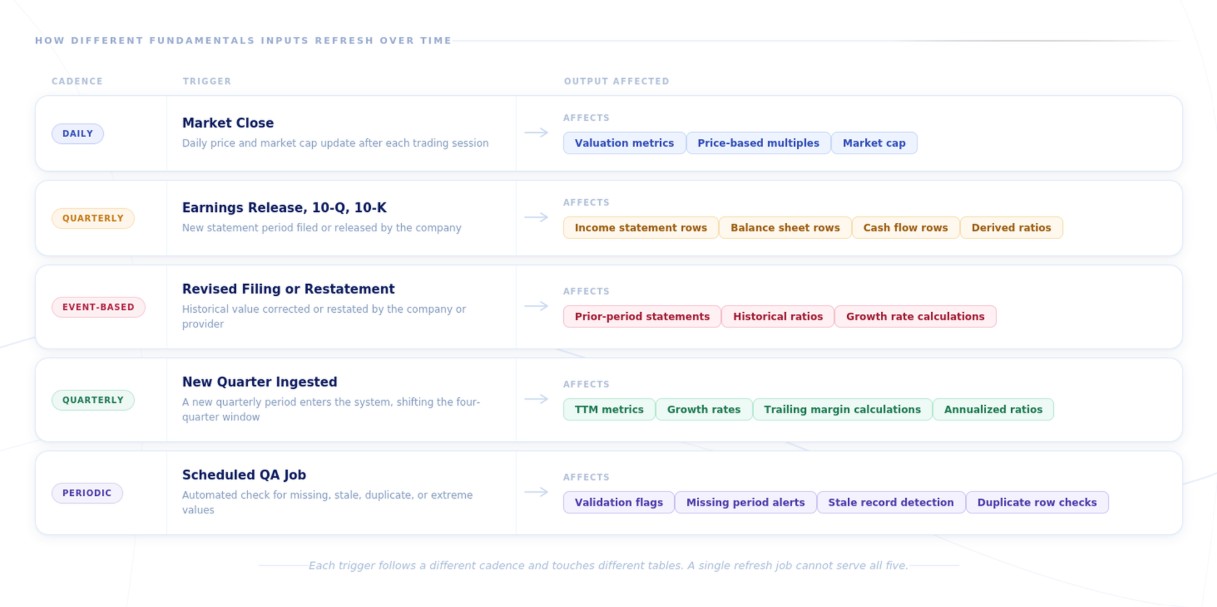
Example refresh trigger map showing how market close, filings, restatements, new quarters, and QA checks affect different fundamentals tables.
Price data and fundamentals data do not follow the same refresh pattern. A price table can be updated daily, intraday, or in real time, depending on the use case. Each trading session can produce new open, high, low, close, volume, and market cap values.
Fundamentals are tied to company reporting cycles rather than market sessions. Income statements, balance sheets, cash flow statements, ratios, and key metrics usually change around earnings releases, 10-Qs, 10-Ks, restatements, revised filings, or provider-side updates. A fundamentals refresh workflow should account for those reporting events and downstream dependencies instead of treating every field like a daily price feed.
Price Data Usually Follows The Market
Price-linked data is usually refreshed around trading activity. A dashboard might update prices and market cap after the market close, while a trading product may need intraday or real-time updates. A valuation screen may refresh price-based multiples once the latest price or market cap is available.
That cadence is relatively straightforward because the trigger is market activity. When a new trading session produces updated price, volume, or market cap data, the affected price-linked fields can be refreshed.
Fundamentals Follow Company Reporting Events
Financial statements follow company reporting cycles rather than market sessions. Income statements, balance sheets, and cash flow statements usually update around earnings releases, 10-Q filings, 10-K filings, provider processing cycles, and events such as revised filings and restatements.
Until one of those events occurs, most statement fields should not be treated like daily-changing market data. A daily fundamentals process can still run, but its job is to check for new filings, provider-side updates, revised records, stale values, and market-linked changes, then refresh only the tables that depend on those inputs.
Derived Metrics Need Recalculation Logic
Ratios, key metrics, growth rates, and TTM values often depend on source statement data. When a new cash flow statement is added, free cash flow metrics may need to refresh. When a new income statement is added, margin ratios, growth rates, and TTM calculations may need to refresh as well.
This is one of the more common places stale data enters a fundamentals workflow. The statement table may show the latest filing, while the derived metrics table is still using inputs from the prior period. A good refresh process should track those dependencies so updated statements trigger the related recalculations before the data is used in a screener, dashboard, or model.
Market-Linked Fundamentals Need Separate Refresh Logic
Some fundamentals-related fields depend on market data even when the underlying statements have not changed. Valuation metrics are the clearest example. Price-to-earnings, market cap, and other price-linked fields may move after the market close because the market input changed, not because the company filed new financial statements.
That creates a separate refresh path. The workflow has to know which tables should update after market activity and which tables should wait for a filing, revision, restatement, or recalculation event.
|
Data Type |
Typical Refresh Trigger |
|
Price and market cap |
Trading day or intraday market update |
|
Financial statements |
Filing, earnings release, revision, or restatement |
|
Ratios and key metrics |
New statement data or changed market-linked inputs |
|
TTM metrics |
New quarterly or annual statement data |
|
Validation flags |
Missing data, duplicate periods, stale records, or outliers |
A daily fundamentals process can still be useful, but it should not refresh every table blindly. Its job is to check which inputs changed, identify the tables that depend on those inputs, and update only the affected layers.
The Datasets That Need Separate Refresh Logic
A bulk fundamentals workflow should not refresh every dataset on the same schedule. Statement data, derived metrics, company metadata, market-linked fields, and event-driven inputs each create different downstream dependencies.
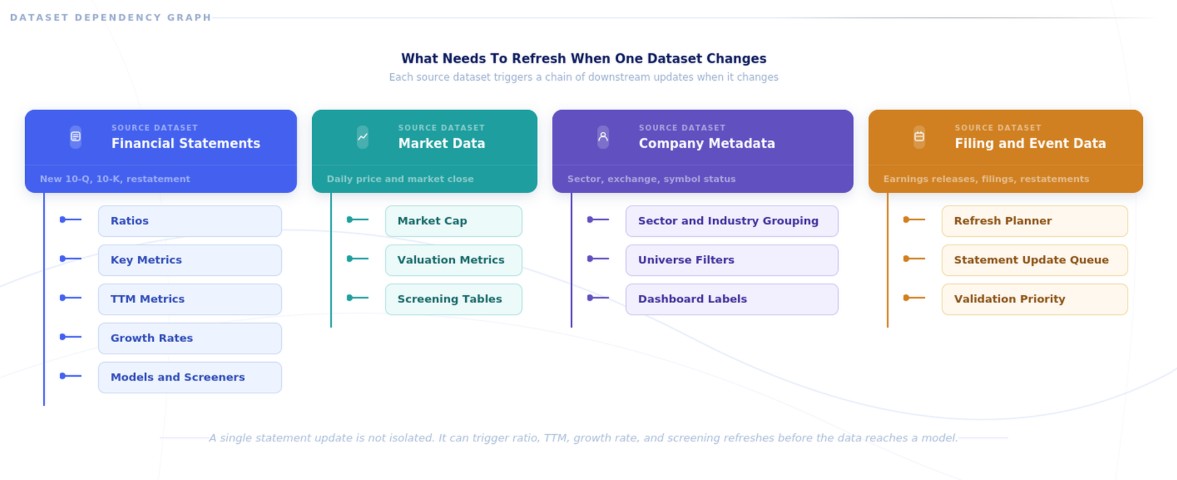
For teams using FMP's Ultimate or Enterprise plans, the Bulk and Batch Delivery endpoints can be grouped by the role they play in the refresh process. This table should work as a quick endpoint map for readers before the article explains each dataset group in more detail.
|
Refresh Role |
Relevant FMP Bulk Endpoints |
How They Fit The Workflow |
|
Company metadata and universe setup |
Helps define the company universe, peer sets, sector and industry groupings, and reference fields used downstream. |
|
|
Core financial statements |
Income Statement Bulk, Balance Sheet Statement Bulk, Cash Flow Statement Bulk |
Supports large-universe refreshes of standardized statement data across periods. |
|
Statement growth and trend checks |
Income Statement Growth Bulk, Balance Sheet Statement Growth Bulk, Cash Flow Statement Growth Bulk |
Helps identify period-over-period changes and supports validation or trend monitoring. |
|
Derived fundamentals and TTM metrics |
Supports refreshed TTM metrics, ratios, screening fields, and model-ready derived tables. |
|
|
Market and valuation context |
Helps refresh market-linked valuation context and related score-based fields where relevant. |
|
|
Analyst and expectations context |
Price Target Summary Bulk, Stock Rating Bulk, Upgrades Downgrades Consensus Bulk, Earnings Surprises Bulk |
Adds optional context for research tools, dashboards, and screening workflows that include analyst or earnings reaction layers. |
|
ETF and ownership context |
Useful when the workflow needs ETF exposure, holdings context, or fund-related ownership views. |
Bulk endpoints are available on Ultimate and Enterprise plans. Teams using lower-tier access may still be able to prototype refresh logic with smaller requests, but large-universe bulk refresh workflows should be matched to the appropriate plan, endpoint access, and usage limits.
Financial Statements
Financial statements are the core source data for a fundamentals refresh workflow. In FMP data, that usually means income statements, balance sheets, and cash flow statements across annual and quarterly periods, with standardized statements used for consistency and as-reported statements used when the workflow needs filing-level traceability.
These rows usually refresh around reporting events such as earnings releases, 10-Qs, 10-Ks, revised filings, restatements, and provider-side updates. A refresh job may add a new period, update an existing value, or require a prior period to be rechecked. That is why the workflow needs to match records by symbol, fiscal year, fiscal quarter, period end date, filing date, and statement type before updating downstream tables.
For most screeners, dashboards, and model-ready tables, standardized statements are the better default because fields are normalized across companies and periods. As-reported statements are useful for validation, reconciliation, audit trails, and edge-case review against what the company originally filed.
Derived Metrics
Ratios, key metrics, growth rates, valuation fields, and TTM metrics all depend on other inputs. Some are tied mainly to statement data, while others also depend on market data such as price, market cap, or enterprise value.
That means each metric needs to be refreshed according to the inputs behind it. Gross margin depends on income statement data. Price-to-earnings depends on both earnings and market price. TTM revenue depends on the latest four quarters. If one input changes and the dependent metric is not recalculated, the workflow can show current source data with stale derived values.
Company Metadata
Company metadata usually does not need the same refresh cadence as prices or filings, but it still needs to be maintained. Company name, exchange, sector, industry, symbol status, profile fields, share count, and float data can all affect how records are grouped, filtered, and displayed downstream.
Stale metadata can create practical problems even when the statement data is correct. A symbol may become inactive, move exchanges, change names, or require updated sector and industry information. A refresh workflow should check these fields on a periodic schedule so dashboards, screeners, peer groups, and reference tables do not rely on outdated company records.
Event-Driven Inputs
Some datasets are useful because they tell the workflow when another table may need attention. Earnings dates, SEC filings, revised filings, restatements, and relevant corporate actions can all act as refresh triggers.
Instead of refreshing the full universe blindly, the workflow can use these events to prioritize symbols with recent reporting activity, changed records, or data that needs review. That keeps the refresh process more targeted and reduces unnecessary pulls across tables that have not changed.
A Practical Architecture For Bulk Fundamentals Refresh
A bulk fundamentals refresh workflow needs a clear path from the company universe to model-ready tables. The process is not just a larger data pull. It has to decide what changed, which records need to be updated, which dependent tables need recalculation, and which outputs are safe to move into production.
Most teams handle this in two phases. The first is an initial backfill, which populates the historical database across companies, reporting periods, statements, ratios, key metrics, and TTM fields. The second is ongoing refresh, where the system checks for new filings, revised records, market-linked changes, stale values, validation flags, and dependent recalculations.
A practical workflow can look like this:
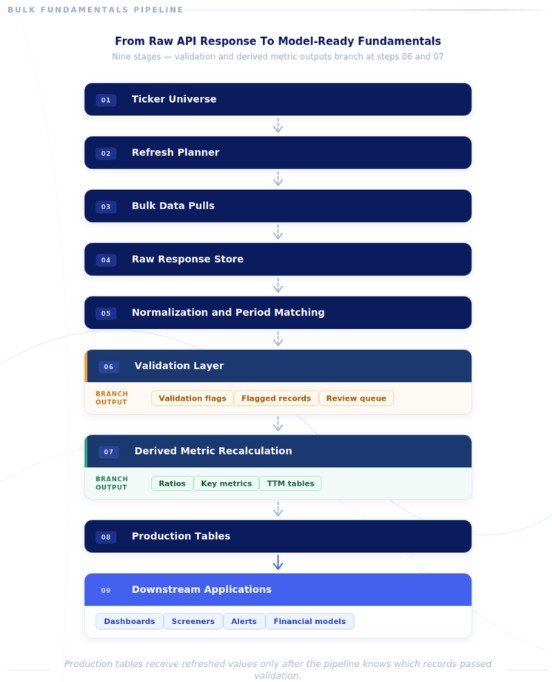
Example bulk fundamentals refresh architecture showing how raw API responses move through normalization, validation, recalculation, production tables, and downstream applications.
This architecture assumes true bulk access across a large universe. In FMP, that means using Bulk and Batch Delivery endpoints available on Ultimate and Enterprise plans. Smaller accounts may still prototype the same refresh logic with limited requests, but the full version should be designed around bulk endpoint access, usage limits, and plan coverage.
Each layer does a specific job:
- Ticker Universe: The set of companies the workflow needs to maintain. This could be a portfolio, watchlist, sector, exchange, or broader equity universe.
- Refresh Planner: Decides what needs to update and when. Price-linked fields may refresh daily, while statements usually update after filings, earnings releases, or provider-side updates.
- Bulk Data Pulls: Pulls the required statements, ratios, key metrics, and company profile data across the selected universe.
- Raw Response Storage: Keeps a copy of the original API response before transformation. This helps when a value needs to be checked later.
- Normalization And Period Matching: Converts raw responses into structured records by symbol, fiscal year, fiscal quarter, period end date, filing date, and statement type.
- Validation Checks: Flags missing periods, duplicate records, stale values, incomplete rows, and unusual changes before the data reaches production tables.
- Derived Metric Recalculation: Updates ratios, key metrics, growth rates, valuation metrics, and TTM values after new statement data or market-linked inputs arrive.
- Database Tables: Stores clean, structured records that downstream tools can query consistently.
- Downstream Applications: Uses the refreshed data in dashboards, screeners, alerts, portfolio tools, research databases, and financial models.
The important requirement is traceability. A team should be able to see what was pulled, how it was normalized, which checks ran, which records were flagged, and when the final tables were updated.
Daily, Filing-Triggered, And Periodic Refresh Layers
A fundamentals refresh workflow works best when refresh jobs are split by cadence. Some fields need to update after each trading day, while others should wait for filings, revised records, recalculation events, or scheduled validation checks.
|
Refresh Layer |
Dataset Type |
Typical Trigger |
Why It Matters |
|
Daily Market-Linked Refresh |
Price, market cap, valuation metrics |
Trading day close |
Keeps valuation views current |
|
Filing-Triggered Refresh |
Income statement, balance sheet, cash flow statement |
Earnings release, 10-Q, 10-K, revised filing |
Updates the core fundamentals layer |
|
Recalculation Layer |
Ratios, TTM metrics, growth rates |
After statement or market-linked updates |
Prevents stale derived metrics |
|
Metadata Refresh |
Company profile, exchange, sector, symbol status |
Scheduled periodic job |
Keeps reference data current |
|
QA Refresh |
Missing periods, duplicates, outliers, stale records |
Scheduled validation checks |
Catches issues before data enters models |
A daily refresh job can still run, but it should check what actually needs attention. That may include market-linked updates, new filing detection, stale-record detection, provider-side changes, and dependent metric recalculation. The point is not that every fundamentals field changes daily. The point is that the workflow should identify which inputs changed, which tables depend on those inputs, and which downstream records need to be refreshed.
Dependency Map: What Should Refresh Next
A refresh workflow also needs dependency logic. When one dataset changes, the system should know which downstream tables need to be checked, recalculated, or held for review.
|
Trigger Or Changed Dataset |
What Should Refresh Next |
Why It Matters |
|
New income statement row |
Margins, growth rates, TTM metrics, ratios, key metrics, screening tables |
Keeps derived metrics aligned with the latest reported income statement data. |
|
New balance sheet row |
Leverage ratios, liquidity ratios, key metrics, share-count-sensitive metrics |
Keeps balance-sheet-dependent metrics current. |
|
New cash flow statement row |
Free cash flow, cash flow margins, TTM cash flow metrics, quality checks |
Keeps cash-flow-based metrics current. |
|
Market close or EOD update |
Market cap, valuation-linked metrics, price-based screens |
Keeps market-linked fundamentals current. |
|
Updated company profile |
Sector, industry, exchange, status, peer grouping, dashboard filters |
Prevents stale metadata from breaking downstream views. |
|
Restatement or revised filing |
Historical statements, historical ratios, TTM values, validation flags |
Ensures prior-period changes flow through dependent tables. |
|
Validation failure |
Review queue, validation_flags table, production update block |
Keeps incomplete or failed records out of models, dashboards, and screeners. |
The point is to make refresh dependencies explicit before updated records move into production tables.
How To Handle Annual, Quarterly, And TTM Data
Annual, quarterly, and TTM data can live in the same fundamentals system, but they should not follow the same refresh rules.
Annual data is useful for multi-year comparisons, including revenue growth, margin trends, leverage history, and return metrics. It usually changes after a 10-K, revised annual filing, restatement, or provider-side update. A daily job can check annual tables for changes, but it should not expect annual values to move often.
Quarterly data needs closer monitoring because it captures the most recent reporting cycle. New 10-Qs, earnings releases, and revised quarterly values can change the latest operating picture before the next annual filing is available. Each row should be matched to the correct fiscal year, fiscal quarter, period end date, and filing date so the workflow does not create duplicate quarters, miss periods, or break trend calculations.
TTM data is where refresh workflows often fall out of sync. Screeners and dashboards may use TTM revenue, EBITDA, free cash flow, gross margin, net debt, and other trailing metrics because they are more current than the last annual statement. If a new quarter is added but the TTM layer is not refreshed, the system can show current statements alongside stale derived metrics.
Teams usually handle TTM in one of two ways:
|
TTM Approach |
Where It Works Best |
Main Tradeoff |
|
Provider-calculated TTM metrics |
Screeners, dashboards, faster setup |
Less control over calculation logic |
|
Internally calculated TTM metrics |
Research models, backtests, audit-heavy workflows |
More transformation and validation work |
The refresh rule is straightforward: when a new quarter enters the system, any dependent trailing, annualized, growth, ratio, valuation, screening, or model-ready table should be queued for review or recalculation. Otherwise, the statement layer may be current while the TTM layer is still stale.
Database Design For A Fundamentals Refresh Workflow
The database does not need to be complicated, but it should separate the layers that serve different jobs. Raw API responses, normalized statement rows, derived metrics, validation flags, and production tables should not all be treated as the same type of record.
A simple schema might include:
|
Table |
What It Stores |
|
companies |
Symbol, company name, exchange, sector, industry, and status fields |
|
financial_statements |
Normalized income statement, balance sheet, and cash flow rows by company and period |
|
financial_statement_raw_responses |
Original API responses before transformation |
|
financial_ratios |
Ratios by symbol, fiscal period, and reporting frequency |
|
key_metrics |
Standardized metrics used in screeners, models, and dashboards |
|
ttm_metrics |
Trailing twelve-month values and recalculated TTM fields |
|
filing_events |
Filings, earnings releases, restatements, and revised data events |
|
refresh_runs |
Job start time, end time, status, skipped symbols, and errors |
|
validation_flags |
Missing periods, duplicates, stale records, outliers, and incomplete rows |
This table is illustrative, not a required schema. Different teams may use different warehouses, databases, or table names. The important design choice is separating raw responses, normalized records, validation flags, refresh logs, and production-ready outputs.
Raw response storage gives the team a source-level record of what came back from the API before transformation. Normalized tables give dashboards, screeners, models, and research tools a consistent structure to query. If a margin, ratio, or TTM value looks wrong, the team should be able to trace it back through the raw response, transformation logic, validation result, and refresh run.
A good schema should make three questions easy to answer: when did this value change, why did it change, and did it pass validation before entering a model?
Validation Checks Before Fundamentals Enter Models
A refresh job should not push new fundamentals straight into production tables. Before the data reaches screeners, dashboards, alerts, research tables, or models, the workflow should check whether the new records are complete, period-matched, and safe to use.
This matters most at the handoff between refreshed data and model inputs. Once a value is used in a margin calculation, valuation screen, leverage ratio, or dashboard filter, a small data issue can spread through multiple downstream outputs. That is why validation should happen before the data enters a financial model, not after a broken metric appears in production.
At minimum, the refresh layer should check for:
- Missing fiscal periods
- Duplicate annual or quarterly rows
- Unexpected fiscal year or fiscal quarter changes
- Stale records after a new filing or earnings release
- Incomplete statement rows
- Negative values where they do not make sense
- Extreme margin, leverage, or growth changes
- Zero denominators in ratio calculations
- Currency mismatches
- Share count changes that affect per-share metrics
- Annual and quarterly values that do not reconcile cleanly, especially when revised filings or restatements affect prior-period data
- Statement updates without matching ratio or TTM recalculation
- Symbols that are inactive, delisted, renamed, or moved to another exchange
Some checks are simple row-level checks. Others require comparison against prior periods, prior refresh runs, or related tables.
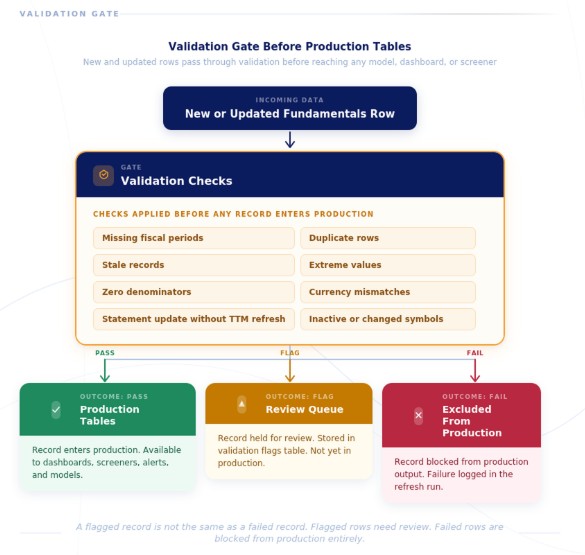
Example validation gate showing how new or updated fundamentals rows can pass into production, move into a review queue, or be blocked from production when checks fail.
If revenue drops 60% quarter over quarter, the workflow should not automatically reject the row. The move may be real. But it should be flagged so an analyst or data team can review it before the value flows into a user-facing model.
The same applies to ratios. A current ratio, debt metric, margin, or valuation multiple can break when the denominator is zero, missing, or outdated. These issues are easier to catch during the refresh process than after they appear in a dashboard.
Validation flags should be stored, not just printed in logs. A validation_flags table lets analysts see which records passed, which records need review, and which records were excluded from production outputs.
A flagged record is not the same as a failed record. A flagged record may need review before production use. A failed record should be blocked from downstream tables until the issue is resolved.
Example Workflow: Refreshing A Multi-Company Fundamentals Database
Consider a sector watchlist with 300 companies. At that size, the workflow should be treated as a bulk-access use case. In FMP, that means Bulk and Batch Delivery endpoints on Ultimate or Enterprise plans. Smaller accounts can still test the same logic with a limited symbol set, but the full workflow should be designed around bulk endpoint access, usage limits, and plan coverage.
The workflow should not pull every field for every company with the same urgency. It should first decide which records need attention, then update only the source tables and dependent layers affected by new data.
A practical run might look like this:
- Start with the active ticker universe.
- Check recent filings, earnings releases, stale records, and market-linked updates.
- Pull updated statements, ratios, key metrics, TTM data, and profile data where needed.
- Store the raw API responses.
- Normalize statements by symbol, period, fiscal year, fiscal quarter, and statement type.
- Recalculate TTM metrics, growth rates, margins, and valuation fields affected by the update.
- Run validation checks.
- Update production tables only after checks pass.
- Log skipped symbols, failed pulls, and flagged records.
- Push clean data to dashboards, screeners, models, and alerts.
A refresh run log can make the process easier to monitor:
|
Run Date |
Dataset |
Trigger |
Symbols Checked |
Records Updated |
Records Flagged |
Downstream Tables Refreshed |
|
2026-06-17 |
EOD Bulk |
Market close |
300 |
300 |
0 |
Valuation metrics, market cap, price-based screens |
|
2026-06-17 |
Income Statement Bulk |
New filing detected |
300 |
12 |
2 |
Margins, growth rates, TTM metrics |
|
2026-06-17 |
Ratios TTM Bulk |
Statement update |
300 |
12 |
1 |
Screening tables, model inputs |
|
2026-06-17 |
Company Profile Bulk |
Scheduled metadata refresh |
300 |
4 |
0 |
Company metadata, sector filters, peer grouping |
A light version of the workflow can be written as pseudocode:
|
for symbol in universe: if needs_refresh(symbol): pull_updated_fundamentals(symbol) store_raw_response(symbol) normalize_periods(symbol) run_validation_checks(symbol) if validation_passed(symbol): recalculate_derived_metrics(symbol) update_production_tables(symbol) else: write_validation_flag(symbol) write_refresh_log() |
This pseudocode is conceptual. Endpoint syntax, parameters, and access rules should be verified against the FMP docs before implementation.
The sequencing matters because each step protects the next one. Raw data is stored before transformation. Periods are normalized before validation. Derived metrics update only after the source data is clean. Production tables receive refreshed values only after the workflow knows which records passed and which records need review.
This also keeps failures contained. If one company has a missing quarter or a malformed response, the full refresh job does not need to fail. The pipeline can flag that symbol, skip the production update, and keep the rest of the universe current.
When Bulk Endpoints Help Most
Bulk endpoints become useful when a workflow moves from one-off lookups to recurring updates across a defined company universe. A single-symbol request works well for testing, prototyping, or checking endpoint behavior. It is not the right operating model for maintaining fundamentals across a portfolio, sector, exchange, or broad research universe.
Teams usually need bulk access when they want to:
- initialize a large fundamentals database
- refresh statements across many companies
- update ratios, key metrics, and TTM fields on a recurring schedule
- maintain screening tables
- reduce repeated symbol-by-symbol calls
- standardize ingestion across datasets
- keep dashboards and models current across a defined universe
This is where bulk financial data APIs are most useful. Instead of designing the workflow around individual tickers, the team can think in terms of datasets, dependencies, refresh cadence, and downstream tables.
FMP supports bulk fundamentals workflows through structured access to statement data, company profile data, ratios, key metrics, TTM metrics, growth data, and related market-linked fields. That gives teams a practical way to connect ingestion, validation, recalculation, and production tables inside a repeatable refresh process.
This is mainly an Ultimate and Enterprise use case. FMP's Bulk and Batch Delivery endpoints are built for teams that need repeatable updates across a defined universe. Lower-tier users may still be able to prototype refresh logic with smaller requests and limited symbol sets, but large-universe bulk delivery depends on the appropriate plan access, endpoint availability, usage limits, and workflow scale.
When A Fundamentals API Is Not Enough
A fundamentals API can support the refresh layer for statements, ratios, key metrics, company data, TTM metrics, and related market-linked fields. It is not meant to replace every type of market or reference-data infrastructure a team may need.
Some workflows require additional sources, especially when they depend on:
- institutional point-in-time backtesting
- full corporate actions adjustment history
- security master fields such as CUSIP, FIGI, or PermID
- ultra-low-latency OHLCV or tick data
- official ratings agency data
- bond-by-bond fixed-income reference data
- complete corporate actions golden-source workflows
Those are different problems from fundamentals refresh. A research dashboard may only need clean quarterly statements, TTM metrics, valuation ratios, company metadata, and market-linked context. A point-in-time backtest may need historical index membership, identifier mapping, delisting logic, corporate action adjustments, and exact data availability timestamps.
FMP fits best as the structured fundamentals layer inside a broader data system. For teams maintaining statements, ratios, key metrics, TTM data, company profiles, bulk delivery, and related market context, FMP can support the core refresh workflow. For security-master, tick-data, institutional backtesting, fixed-income reference, or complete corporate-actions workflows, teams may still need specialized systems alongside it.
Turning Raw Fundamentals Into Model-Ready Data
Reliable fundamentals pipelines are built around refresh discipline. The question is not only whether the data can be accessed. It is whether each dataset is refreshed at the right cadence, matched to the right fiscal period, validated before use, and kept aligned with the metrics that depend on it.
A new 10-Q can update statement rows. A revised filing can change historical values. A market close can move valuation metrics. A new quarter can make TTM tables stale if the recalculation layer does not run on time.
The goal is not just bulk delivery. The goal is to turn raw API responses into validated, period-matched, recalculated, model-ready fundamentals. For teams with bulk access, FMP can support that workflow across statements, ratios, key metrics, TTM data, company metadata, and market-linked fields. Teams testing the logic at a smaller scale should match the workflow to their plan limits before expanding.