Using Real-Time Market Data for Trading and Quant Analytics

Every algorithmic model depends on one thing: timely data.
Real-time market data refers to continuously updating prices, volumes, and indicators delivered directly from exchanges through APIs — essential for building responsive trading and analytics systems.
In modern systems, real-time market data flows straight from the feed into feature engineering, signal generation, and order routing. If the feed lags, momentum flips can be missed, spreads can close, and stops can slip.
With Financial Modeling Prep (FMP) you can stream stock market data feeds (quotes, intraday OHLCV, technical indicators) fast enough to power stock market data analysis, trading dashboards, and live strategies.
The diagram below shows how data flows through a modern trading workflow — from market feeds to execution and risk monitoring.
Figure 1 — Trading Workflow (ASCII)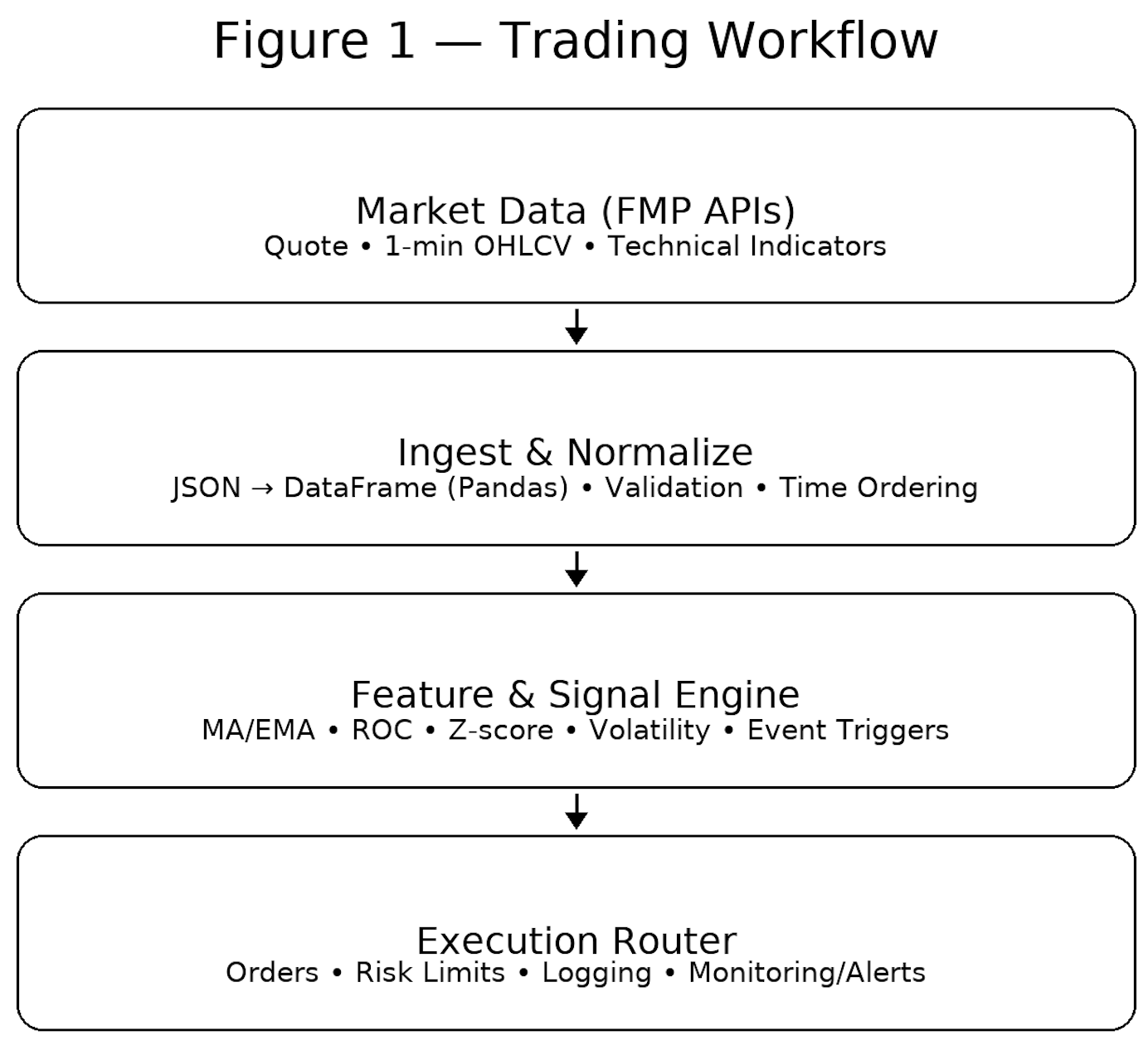
Let's break down how quants and traders transform live data into strategy.
How Traders Apply Real-Time Market Data
Real-time feeds enable short-horizon tactics where seconds (or less) matter. Below is a compact map of common strategies and their data needs.
Table 1 — Common Trading Strategies Using Real-Time Data
|
Strategy |
Core Metric |
Data Frequency |
Goal |
|
Momentum |
Price change velocity (ROC/slope) |
1s-1m |
Capture continuation |
|
Mean Reversion |
Deviation from moving average |
1m-5m |
Profit from reversals |
|
Arbitrage |
Cross-market price gaps |
<1s |
Exploit mispricing |
Momentum
Track short-term acceleration. With 1-minute AAPL data, compute ROC or a fast EMA slope; when slope and volume confirm, enter in the direction of strength and trail a dynamic stop.
Mean Reversion
Compare price to an intraday MA/VWAP. If AAPL travels >2σ above a 20-period 1-minute average, fade the move with tight risk and exit into the reversion.
Arbitrage
Monitor the same asset across venues or related pairs; execute when a micro-spread opens. This demands sub-second quotes and low-latency execution.
FMP Real-Time APIs You'll Use
Below are the endpoints we'll call and how they fit into trading data API workflows. These examples show how each API fits into a live trading workflow
1) Real-Time Stock Quote (snapshot)
Endpoint:
|
https://financialmodelingprep.com/stable/quote?symbol=AAPL&apikey=api_key |
What it returns:
|
[ { "symbol": "AAPL", "name": "Apple Inc.", "price": 247.08, "changePercentage": -0.23419, "change": -0.58, "volume": 23258596, "dayLow": 244.7, "dayHigh": 248.82, "yearHigh": 260.1, "yearLow": 169.21, "marketCap": 3666763561200, "priceAvg50": 237.9244, "priceAvg200": 222.2168, "exchange": "NASDAQ", "open": 246.615, "previousClose": 247.66, "timestamp": 1760471369 } ] |
How traders use it:
- Dashboard tiles (price, % change, volume).
- Sanity-check latency by comparing timestamp to local time.
- Regime filters (e.g., price vs. priceAvg50/200).
2) 1-Minute Intraday Chart (OHLCV stream)
Endpoint:
|
https://financialmodelingprep.com/stable/historical-chart/1min?symbol=AAPL&apikey=api_key |
What it returns (sample from your spec):
|
[ { "date": "2025-10-14 15:48:00", "open": 247.05, "low": 246.93, "high": 247.1443, "close": 247.03, "volume": 51807 }, { "date": "2025-10-14 15:47:00", "open": 247.318, "low": 246.955, "high": 247.318, "close": 247.08, "volume": 66809 }, { "date": "2025-10-14 15:46:00", "open": 247.06, "low": 247.06, "high": 247.41, "close": 247.34, "volume": 113060 }, { "date": "2025-10-14 15:45:00", "open": 247.08, "low": 246.97, "high": 247.18, "close": 247.0447,"volume": 98632 } ... ] |
How traders use it:
- Compute intraday features (EMAs, ROC, z-scores, ATR).
- Trigger tactics (breakouts, fades) on fresh bars.
- Build stock market data dashboards that refresh each minute.
3) EMA Technical Indicator
Endpoint:
|
https://financialmodelingprep.com/stable/technical-indicators/ema?symbol=AAPL&periodLength=10&timeframe=1day&apikey=api_key |
What it returns (sample from your spec):
|
[ { "date": "2025-10-14 00:00:00", "open": 246.615, "high": 248.82, "low": 244.7, "close": 248.3398, "volume": 22398193, "ema": 251.49117773891516 }, { "date": "2025-10-13 00:00:00", "open": 249.38, "high": 249.69, "low": 245.56, "close": 247.66, "volume": 38142942, "ema": 252.19148390311852 }, { "date": "2025-10-10 00:00:00", "open": 254.94, "high": 256.38, "low": 244, "close": 245.27, "volume": 61999100, "ema": 253.19848032603377 } ... ] |
How traders use it:
- Blend intraday signals with daily trend filters (trade long only when price > daily EMA).
- Cross-check client-computed indicators against server values.
Together, these APIs let traders stream live prices, build minute-level features, and cross-check indicators for signal confirmation.
Quant Analytics with Live Market Feeds
Once trading signals are defined, quants use the same data for continuous analytics and model refinement. Real-time updates keep models aligned with the tape.
Common live features:
- Rolling averages (SMA/EMA), slope/ROC
- Volatility (rolling std of returns), ATR, realized variance
- Microstructure signals (bid/ask spread, imbalance)
- Regime flags (price vs 50/200 MA, high/low breaks)
Figure 2 — Real-Time Analytics Flow (ASCII)
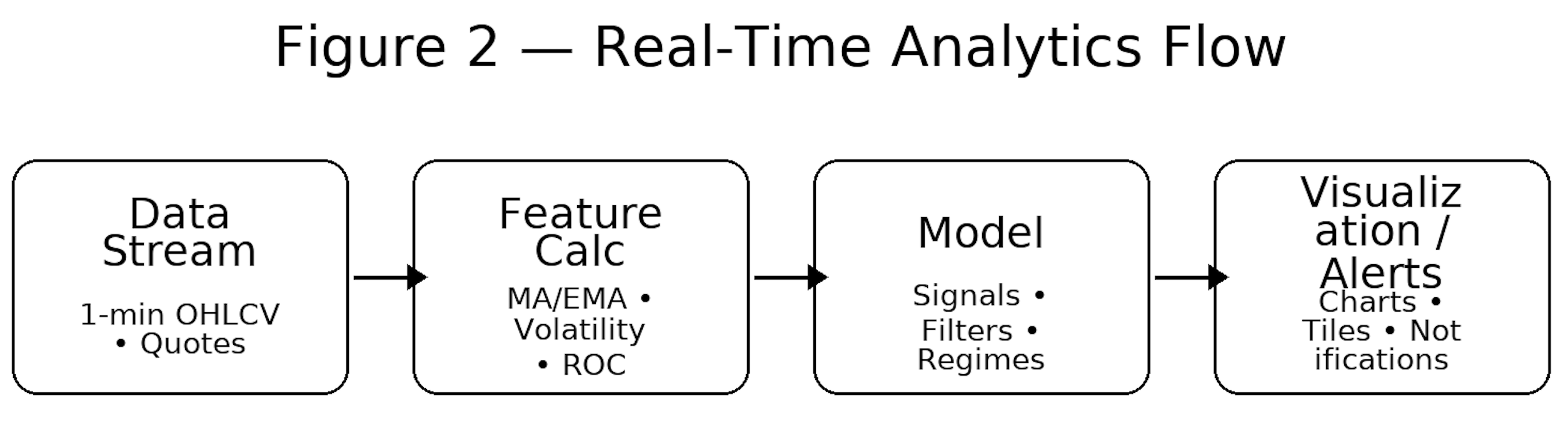
Here's a minimal-average example using Pandas:
df['ma_20'] = df['close'].rolling(20, min_periods=20).mean()
As each new bar lands, your model recalculates features and signals immediately. In quant analysis, real-time data turns historical insight into actionable prediction.
Event-Driven Analysis
Live feeds also detect and react to events: earnings, macro releases, or breaking news often leave signatures (volume/volatility spikes). Event detection systems watch for statistical anomalies — like sudden volume or volatility spikes — that indicate new information hitting the market.
Table 2 — Event-Driven Data Triggers
|
Event Type |
Data Indicator |
Response Action |
|
Sudden volume surge |
Alert trader or switch playbook |
|
|
Market-wide volatility jump |
Adjust portfolio beta/hedges |
|
|
Cross-ticker momentum |
Pause or execute per rule set |
Figure 3 — Real-Time Event Reaction (ASCII: Volume Spike)
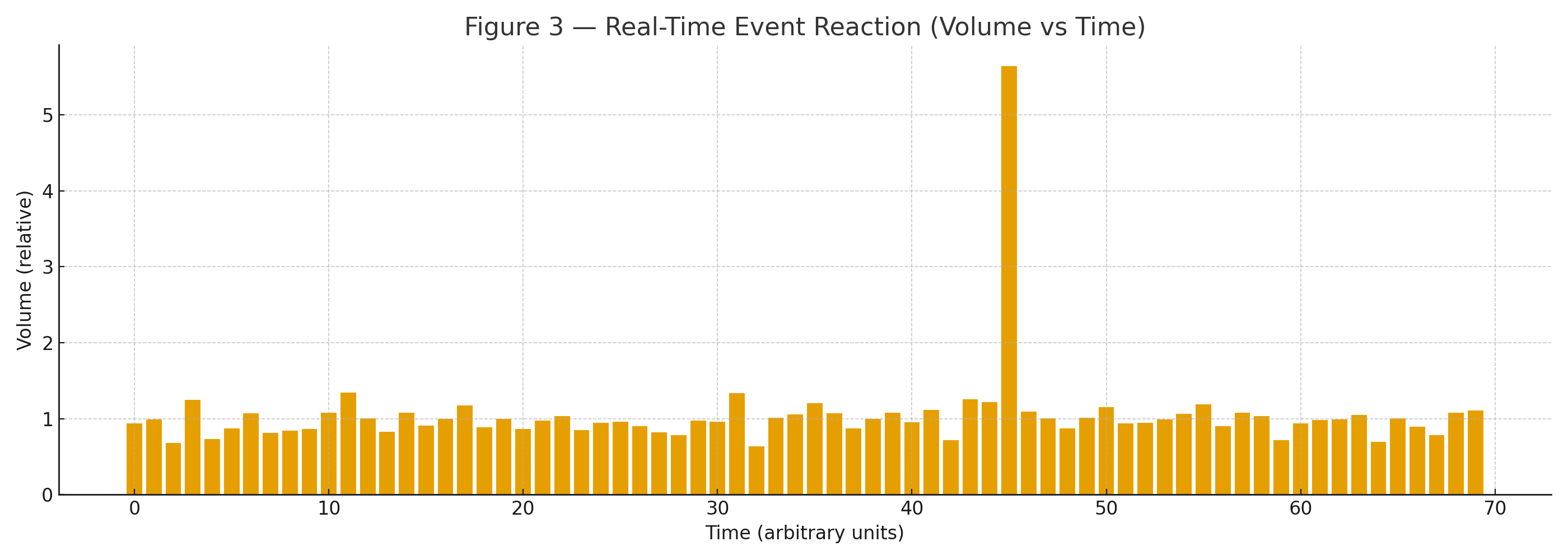
A practical detector compares the last N minutes of volume to a rolling baseline; if the ratio > threshold (e.g., 2.0×), trigger an alert or switch to an “event” mode with different risk and execution rules.
This approach bridges discretionary awareness and automated decision systems.
Integrating Real-Time Data into Models (Python + FMP)
Below is a concise, production-oriented workflow using requests and pandas. Replace api_key with your key.
Figure 4 — Model Integration Flow (API → Python → Strategy)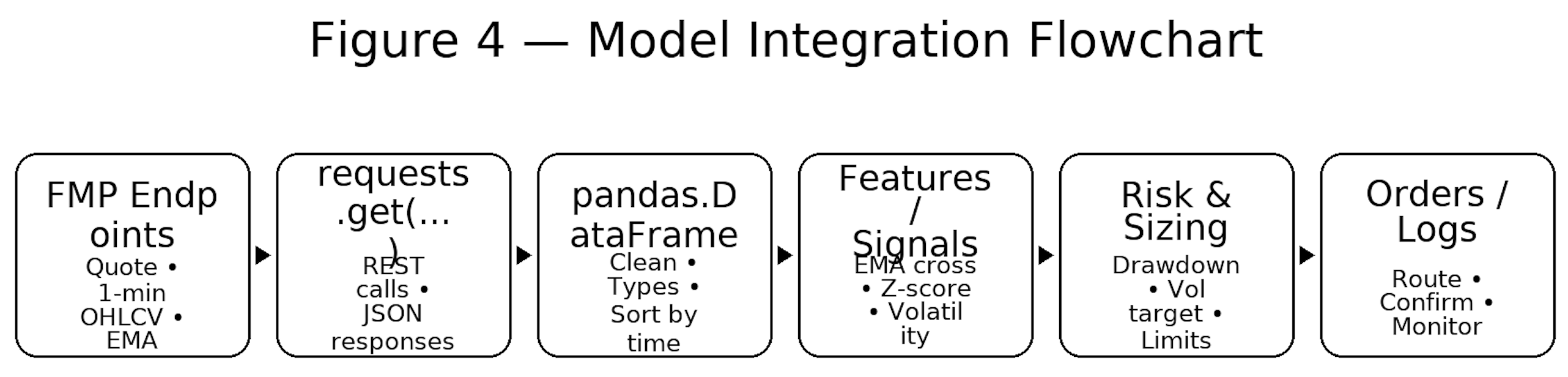
1) Fetch a real-time quote using the FMP Quote API (AAPL)
import requests, pandas as pd
from datetime import datetime
API_KEY = "api_key"
q_url = f"https://financialmodelingprep.com/stable/quote?symbol=AAPL&apikey={API_KEY}"
q = requests.get(q_url, timeout=10).json()[0]
last = q["price"]; vol = q["volume"]
ts = datetime.utcfromtimestamp(q["timestamp"])
print(f"AAPL {last:.2f} @ {ts} UTC | vol={vol:,}")
Use cases: dashboard tiles; latency checks (server timestamp vs. local); regime filters via priceAvg50/200.
2) Pull 1-minute bars and compute intraday features
import math
c_url = f"https://financialmodelingprep.com/stable/historical-chart/1min?symbol=AAPL&apikey={API_KEY}"
bars = requests.get(c_url, timeout=10).json()
df = pd.DataFrame(bars)
df['date'] = pd.to_datetime(df['date'])
df = df.sort_values('date').reset_index(drop=True)
for col in ['open','high','low','close','volume']:
df[col] = pd.to_numeric(df[col], errors='coerce')
df['ret'] = df['close'].pct_change()
df['ema_10'] = df['close'].ewm(span=10, adjust=False).mean()
df['ema_20'] = df['close'].ewm(span=20, adjust=False).mean()
df['z_close'] = (df['close'] - df['ema_20']) / df['ret'].rolling(20).std()
# Annualized intraday volatility proxy (20-min window; ~252 trading days × 390 min/day)
df['vol_20'] = df['ret'].rolling(20).std() * math.sqrt(252 * 390)
Tactics:
- Momentum: go long if ema_10 > ema_20 and ROC positive on rising volume.
- Mean reversion: fade when z_close > +2 (tight stop); cover at mean.
- Volatility-aware sizing: size ∝ 1/vol.
3) Compare to server-side daily EMA (trend filter)
ema_url = ("https://financialmodelingprep.com/stable/technical-indicators/ema"
f"?symbol=AAPL&periodLength=10&timeframe=1day&apikey={API_KEY}")
ema_df = pd.DataFrame(requests.get(ema_url, timeout=10).json())
ema_df['date'] = pd.to_datetime(ema_df['date'])
ema_df = ema_df.sort_values('date')
latest_daily_ema = float(ema_df.iloc[-1]['ema'])
latest_close = float(df.iloc[-1]['close'])
print(f"Daily EMA(10)={latest_daily_ema:.2f} | Last 1m close={latest_close:.2f}")
Blend: only take intraday longs when last price > daily EMA(10).
4) Minimal signal + volatility scaling (illustrative)
# Signal: long when intraday EMA(10) > EMA(20) AND price > daily EMA(10)
df['signal'] = ((df['ema_10'] > df['ema_20']) & (df['close'] > latest_daily_ema)).astype(int)
df['signal'] = df['signal'].shift(1).fillna(0) # act on next bar
# Volatility scaling (toy): cap leverage at 2x
risk_target = 0.01 # 1% daily risk budget
vol_safe = df['vol_20'].replace(0, pd.NA).fillna(method='bfill')
df['pos'] = (risk_target / vol_safe).clip(0, 2.0) * df['signal']
# Naive P&L (ignores fees/slippage/market impact)
df['pnl'] = df['pos'] * df['ret']
5) Event-detection example (volume spike)
# Compare recent volume to rolling baseline
lookback = 20
df['vol_ma'] = df['volume'].rolling(lookback, min_periods=lookback).mean()
df['vol_ratio'] = df['volume'] / df['vol_ma']
df['event_flag'] = (df['vol_ratio'] > 2.0).astype(int) # >2x baseline
if int(df['event_flag'].iloc[-1]) == 1:
print("ALERT: Volume spike detected — switch to event playbook.")
Implementation notes:
- Validate time ordering & gaps; fill/handle missing minutes.Monitor latency (server vs client time); log round-trip.
- Respect rate limits; add retries/backoff.
- Paper-trade before production; add kill switches/circuit breakers.
When these components run together, you have a functional quant prototype — capable of generating and validating live trading signals.
Visualization and Dashboards
Dashboards convert raw ticks into intuition. Once models are generating signals, visualization helps interpret them in real time.
Typical real-time visuals:
- Close with EMA overlays (identify short-term trends)
- Volume bars with anomaly flags
- Volatility panel (rolling σ, ATR)
- Alerts when thresholds breach (e.g., MA cross, breakout)
Figure 5 — Example Real-Time Price Dashboard 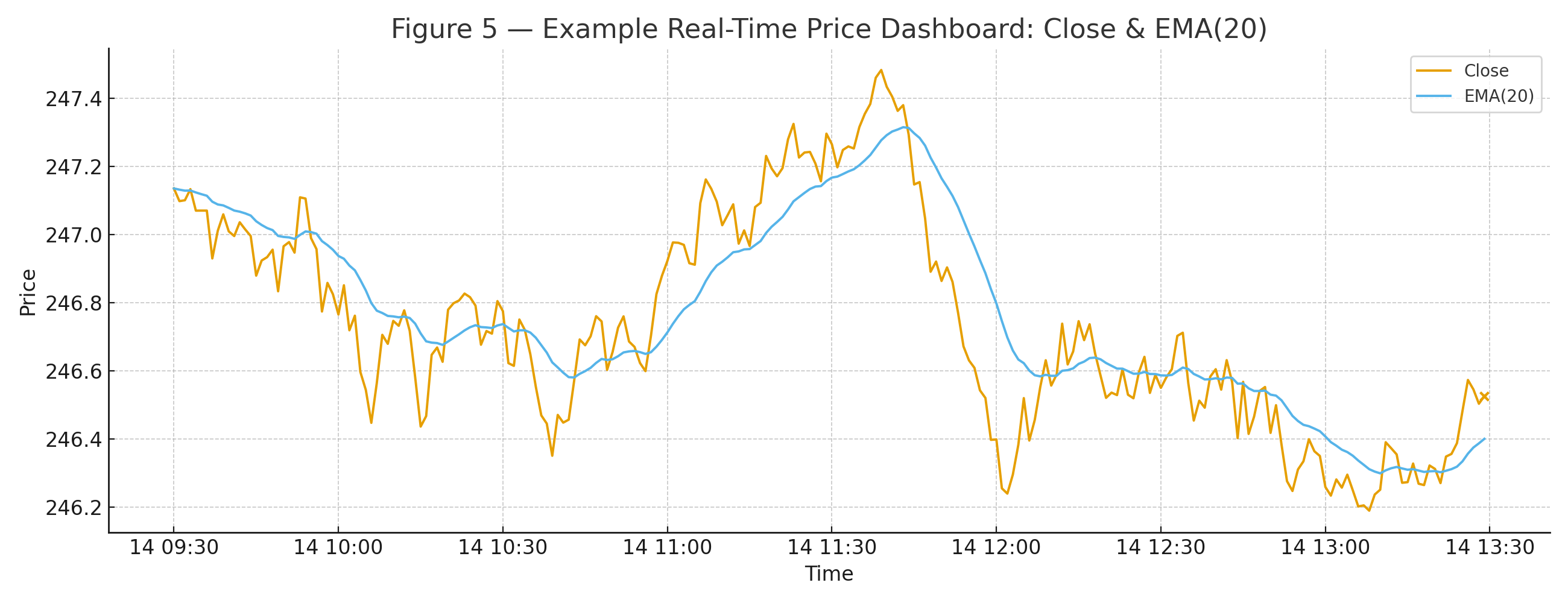
Minimal Matplotlib plot:
import matplotlib.pyplot as plt
ax = df.set_index('date')[['close','ema_20']].plot(figsize=(10,4), linewidth=1.2)
ax.set_title("AAPL — Close vs EMA(20), 1-min")
ax.set_xlabel("Time"); ax.set_ylabel("Price")
plt.tight_layout(); plt.show()
Risk Management and Monitoring
No strategy is complete without safeguards — this section shows how to quantify and react to risk in real time.
Real-time monitoring is risk management in motion. Use live data to enforce limits, reduce size in turbulence, and halt when drawdowns breach rules.
Table 3 — Real-Time Risk Indicators
|
Indicator |
Metric |
Update Interval |
Use Case |
|
Volatility Index |
σ of returns |
1m |
Adjust leverage/size dynamically |
|
Drawdown |
% from running peak |
Continuous |
Alert risk / auto de-risk |
Below are minimal Python examples for tracking volatility and drawdown:
# Rolling volatility (1-min returns)
window = 20
df['vol_20m'] = df['ret'].rolling(window).std()
# Running drawdown on equity curve
df['equity'] = (1 + df['pnl']).cumprod()
df['peak'] = df['equity'].cummax()
df['ddown'] = (df['equity'] / df['peak']) - 1.0
if df['ddown'].iloc[-1] < -0.05: # example: -5% max intraday loss
print("ALERT: Max drawdown exceeded — de-risk now.")
Integrating these alerts into your workflow ensures that capital protection runs as fast as your signal logic.
FAQs
How does FMP provide real-time market data?
FMP delivers millisecond-level updates through REST and WebSocket APIs, combining U.S. and global exchange coverage with low-latency infrastructure.
What is quant analytics?
A data-driven practice that uses statistics, time-series methods, and ML to convert stock market data feeds into signals, risk metrics, and decisions.
How is real-time data used in trading?
It updates features (EMAs, volatility, spreads) and signals the moment a new tick or bar arrives, so orders route with minimal lag.
Can I backtest with real-time feeds?
Backtests use historical data (often the same endpoints but with fixed ranges). After validation, switch to paper/live mode to test with real-time inputs.
What's the difference between live and delayed data?
Live is near-instant; delayed typically lags ~15 minutes. Intraday strategies require live; delayed is fine for end-of-day or long-term investing.

Treasury, trading, liquidity, and equity analysis for investors
Sanzhi writes for FMP with a focus on equity analysis, valuation, market data, and practical investment decision-making. He has worked across financial institutions in treasury, trading, and liquidity roles, bringing hands-on experience in investment analysis, market execution, risk, and strategy. His work focuses on helping readers interpret financial data with clarity, discipline, and an institutional market perspective.
Related




Financial data for every need
Real-time quotes and 30+ years of historical data, including prices, fundamentals, and insider transactions — all accessible via API.
Create Free Account