How Financial Modeling Prep Fits Into Existing Research Workflows (Without Replacing Them)

Finance professionals often get anxious about trying new platforms because they fear having to abandon familiar tools like Excel models or Bloomberg terminal. This article tackles that disruption anxiety head-on. We'll explore how FMP can slot into your existing research workflow as a complementary input, not a wholesale replacement.
This applies whether you're at a large institution with terminals and shared models, or you're an independent analyst, student, or hobbyist developer - running research from a laptop. The point isn't to “switch stacks.” It's to keep the workflow you trust and improve the quality and speed of the inputs.
In the sections below, we'll compare FMP's role alongside Excel spreadsheets and the Bloomberg Terminal, highlight the speed, reliability, and cost efficiency FMP brings, and share examples of how professionals use FMP as an incremental upgrade to what they're already doing. By the end, you'll see how evaluating FMP doesn't mean unplugging your current systems—it means enriching them.
Why New Tools Feel Disruptive (And Why FMP Is Different)
Change can be daunting in finance. Teams have years of processes built around specific software and data sources. Many analysts have intricate Excel models and macros; portfolio managers are accustomed to real-time feeds on their terminals; developers maintain code tied to particular data providers. Introducing a new tool often triggers concerns: Will I have to relearn everything? Will this make my existing setup obsolete? Such questions create resistance to change.
That fear is understandable — Excel still sits at the center of finance work. Survey research from Datarails reports that 89% of companies' financial processes run through Excel, and 40% of finance professionals name it as their favorite business software.
And it's not just practical—it's emotional: 78% of younger pros say they'd either decline a job that banned Excel or accept it only grudgingly. Excel's staying power is also structural—Excel launched in 1985 and has now crossed 40 years of real-world adoption.
Bloomberg fits the same “legacy staple” pattern: Bloomberg describes the Terminal as sitting on the desks of 350,000 decision makers worldwide.
Financial Modeling Prep is designed differently. Rather than attempting to replace your spreadsheet or terminal, FMP is built to slide into your workflow as an additional data source and efficiency booster. Think of it as adding a new resource to your toolkit, not swapping one out. This additive philosophy means you can start small—try one dataset or API—while keeping everything else in place. There's no “rip and replace” mandate. You get comfortable at your own pace, layering FMP's capabilities on top of your established process.
By positioning itself as complementary, FMP removes the pressure. You don't have to immediately abandon familiar workflows. Instead, you augment them: pulling an FMP data feed into Excel here, double-checking a number against FMP's API there, or giving developers access to FMP's cloud data alongside existing sources. This way, the learning curve stays manageable and disruption is minimal. Next, we'll see exactly how this works in practice for spreadsheets, terminals, and custom systems.
Keep Your Spreadsheets: FMP Enhances (Not Replaces) Excel Models
Excel and Google Sheets are the backbone of finance - from valuation models to budget forecasts, analysts live in cells and formulas. That's why any new tool must play nicely with spreadsheets. FMP was built with this reality in mind. It doesn't ask you to close Excel; instead, it provides ways to feed fresh data into your Excel models to save time and reduce manual errors.
Google Sheets (cloud-first workflows)
If your models live in Google Sheets—because you collaborate, work across devices, or just prefer a browser-first setup—FMP fits the same way: as a data layer you can pull into cells on demand. The FMP Sheets add-on supports formula-driven pulls, and CSV endpoints can also feed Sheets for lightweight, no-code refreshes and charting workflows.
Multiples model in Excel using FMP data. 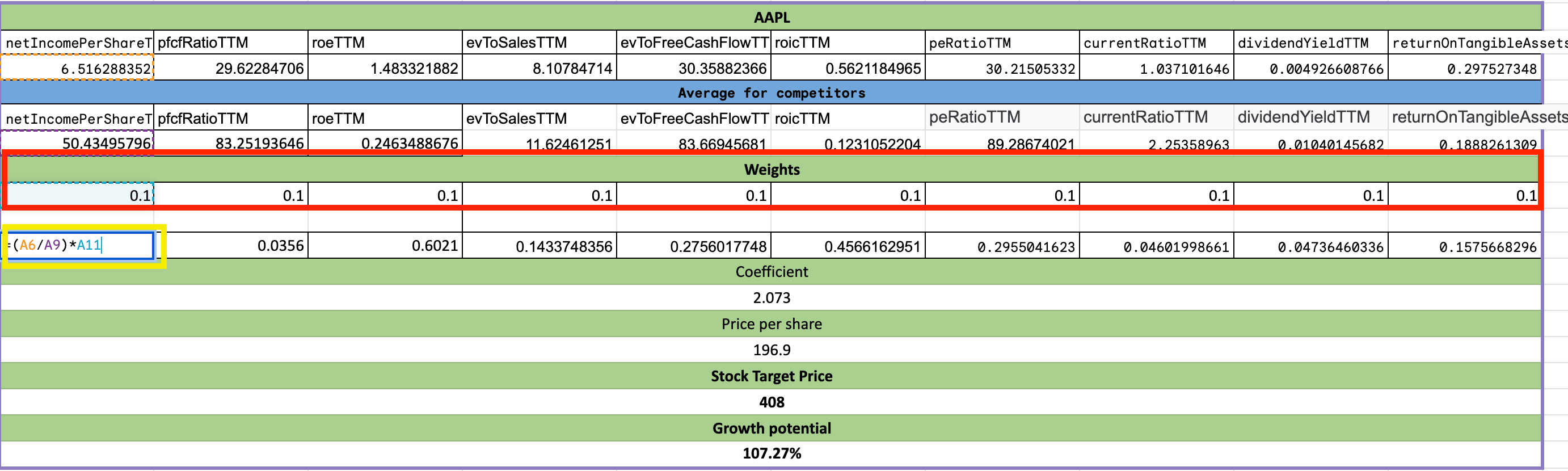
How it fits
Imagine you maintain a discounted cash flow model in Excel. Traditionally, you might manually input financial statements or copy-paste historical prices from various websites each quarter. With FMP, you can pull that data directly into Excel via API or add-ins, keeping your model up-to-date automatically.
DCF model in Excel using FMP data.
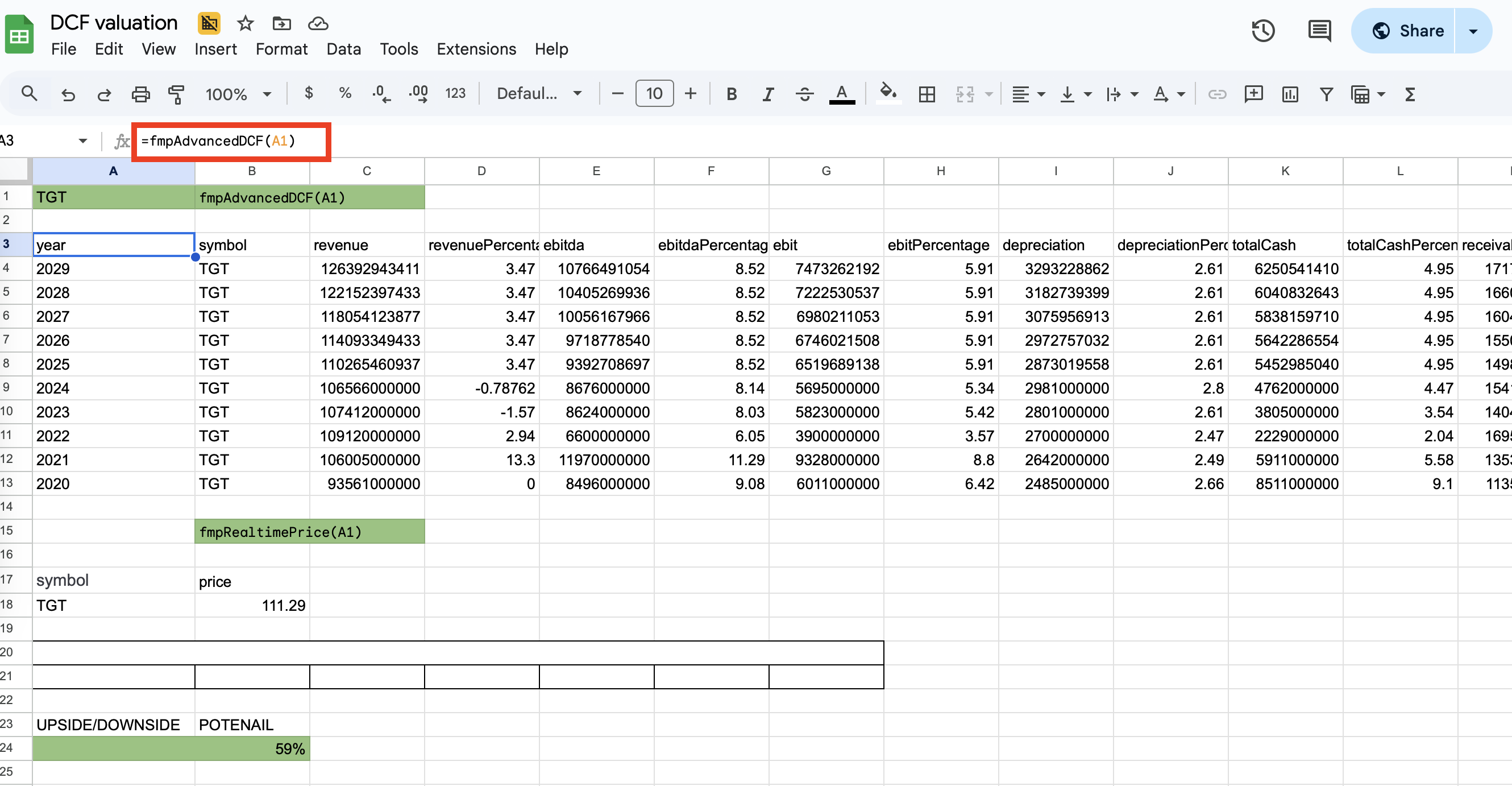
Also, using FMP's Financial Statements API, you could retrieve ten years of financials for a company with a single query, rather than hunting through 10-Ks or typing numbers in by hand. The structure of your spreadsheet doesn't change - you're simply swapping out tedious data collection for a fast, reliable feed.
Analysts who try this often find it speeds up their workflow without altering their analysis process. You still use your familiar Excel formulas, but now the inputs (revenue, EBITDA, growth rates, etc.) flow in from FMP in seconds. This addresses the “frustrating manual work” aspect of Excel noted by professionals, while preserving Excel's flexibility. In short, your trusty spreadsheet stays - FMP just turbocharges it with instant data updates.
|
Real-world example: Consider an equity analyst evaluating a tech stock. They maintain a spreadsheet of key metrics (P/E ratios, EPS, revenue growth) for the past 5 years to spot trends. Instead of updating those figures by scouring financial reports, the analyst can call FMP's Financial Statements API to fetch the latest income statement and balance sheet data into their sheet whenever needed. The analysis - creating charts, computing ratios - is still done in Excel. The difference is the data gathering is now automated and error-free. The analyst spends more time on interpreting results rather than data entry. |
No integration anxiety
Importantly, you don't need to be a developer to use FMP with Excel. While tech-savvy users might write Python scripts or use FMP's R/Python libraries to pipe data into models, others can use FMP's Excel and Google Sheets connectors or even simple CSV downloads. The key point is that evaluating FMP doesn't require discarding your existing Excel files - you enhance them. It's a low-risk, high-reward supplement: if FMP's data makes your spreadsheet analysis faster or more insightful, you benefit immediately, and if not, your original workflow is untouched.
|
Solo-user example: A student or independent investor maintaining a personal valuation template can use the same approach — refresh the latest quarterly financials and price history into a single Excel workbook or Google Sheet before updating assumptions—without spending time hunting through filings or copy-pasting tables. |
Bloomberg Terminal vs. FMP: Complementary, Not Either-Or
The Bloomberg Terminal is renowned for its all-in-one platform—real-time market data, news, analytics, and a dedicated network. It's also famously expensive: pricing is commonly cited around $32,000/year for a single-terminal user.
For many large institutions, Bloomberg is indispensable — but plenty of valid workflows don't include a terminal (independent analysts, students, small teams, and builders). In those cases, FMP can be a cost-effective primary data input; in institutional settings, it can be a practical supplement that extends access beyond the limited number of seats.
How it fits
If your firm uses Bloomberg, you can think of FMP as a way to extend data access to more people or custom applications without incurring huge costs. For instance, maybe only senior analysts or traders have Bloomberg access due to budgeting, leaving junior analysts needing to ask around for data. With FMP's APIs, those team members can retrieve real-time quotes, historical prices, or fundamentals on their own, through FMP's web API or tools, easing the dependency on a limited number of Bloomberg terminals.
No-terminal parallel
If you're working without Bloomberg, the workflow logic stays the same — you still research, model, and validate — but FMP becomes the main source for quotes, fundamentals, and historical data feeding your spreadsheets or code. Instead of “extending terminal access,” you're building a lighter stack that still supports serious analysis.
FMP's Real-Time Market Data API offers live stock quotes and multi-asset coverage that, while not as extensive as Bloomberg, covers most needs for equity and forex price tracking. An analyst could use FMP to stream live prices or news into a custom dashboard, complementing the Bloomberg terminal's data - essentially filling gaps and increasing coverage within the team.
Bloomberg for the big picture, FMP for the custom tasks
Many professionals use Bloomberg for its broad capabilities and discovery (e.g. scanning markets, accessing proprietary analytics). FMP can work alongside by handling targeted data retrieval and feeding internal tools. For example, a portfolio manager might use Bloomberg to chat with other traders and get breaking news, but rely on a Python script with FMP's Historical Market Data to backtest a strategy overnight. By doing so, they leverage Bloomberg's strengths in real-time insight and FMP's strengths in speedy API access and historical data pulls. Neither tool replaces the other; they augment each other's utility.
It's also worth noting the cost efficiency angle. If you're a small firm or independent developer, Bloomberg might simply be out of reach financially. FMP provides a way to get much of the same raw data for a fraction of the cost. In fact, third-party reviewers have noted that FMP offers “one of the best values” among financial data providers. You won't get Bloomberg's chat network or every exotic function, but you might not need them for your use case. Unless you're managing tens of millions with an institutional setup, Bloomberg could be overkill - whereas FMP lets you cherry-pick the data you need, when you need it.
Integrating FMP into Internal Systems and Custom Workflows
Beyond Excel and Bloomberg, many organizations have internal research systems, databases, or custom-built dashboards. Developers might be tasked with maintaining these tools, which often combine data from multiple sources (internal databases, CSV imports, maybe an old Reuters feed, etc.). FMP is built to integrate seamlessly into such custom workflows, again as an add-on module rather than a rip-out-and-replace project.
How it fits
FMP provides data through flexible REST APIs and cloud feeds, which developers can programmatically access. This means you can plug FMP data into almost any application or process that can make web requests.
|
For example, if you have an internal web app for analysts to screen stocks, you could call FMP's Historical Market Data to load historical price charts or use the Financial Statements endpoints to populate fundamental metrics on the screen. All of this can happen behind the scenes without changing the front-end experience for your team. They'll just notice that suddenly the app has more up-to-date info or additional data fields available. |
Crucially, adopting FMP data in your system doesn't mean throwing away existing data sources. You can run FMP in parallel during evaluation. For instance, a developer might integrate an FMP API call for stock prices next to an existing vendor's feed to compare speed or consistency. FMP's data is updated continuously (financials, for instance, update as new filings come out; prices update in real-time), so you can check how it measures up in reliability.
|
Example scenario: A fintech startup has an internal analytics dashboard that currently relies on free web sources and manual CSV uploads for data. This is slow and sometimes incomplete. They integrate a few FMP endpoints - e.g., a company profile API for company descriptions and a stock quote API for live prices - into their backend. Now the dashboard populates instantly with current data whenever an analyst searches a ticker. The internal tool itself remains the central hub; FMP is simply feeding it fresh data. Over time, the developers might replace more and more manual sources with FMP for efficiency, but they'll do so gradually, verifying that each addition works well. At no point do they need to shut off their system to “switch to FMP” - they blend FMP in smoothly. |
This approach is how FMP ends up coexisting with internal processes at many firms. Whether it's an AI model that needs financial data inputs, a risk system that could use up-to-date market metrics, or just a script that automates pulling SEC filings, FMP can slot in as the data provider. You maintain full control over your workflow logic; FMP handles the heavy lifting of delivering the data fast, in a developer-friendly format. And speaking of speed and reliability, let's delve into those benefits next.
Speed, Reliability, and Cost Efficiency: Key Benefits of Adding FMP
When layering a new tool onto your established workflow, it must earn its keep. FMP does so by delivering tangible improvements in speed, data reliability, and cost efficiency that enhance your existing processes.
Speed
FMP's cloud API delivers data on-demand. This means tasks that used to take hours - such as gathering 10 years of stock prices or compiling financial ratios for 50 companies - can be done in moments with a script or function call.
For example, using the FMP API, you could fetch the latest stock price and key metrics for dozens of companies faster than you could type a single ticker into a web search. Your workflow becomes more real-time and responsive, without any extra effort on your part beyond the initial setup. In industries where seconds matter (or simply to free up analyst hours), this speed is a game-changer.
Reliability
The data you get from FMP is sourced from reputable, public filings and market feeds, and is kept consistent and up-to-date by FMP's backend systems. In fact, FMP is trusted by leading financial organizations including major hedge funds and universities. By adding FMP to your workflow, you're tapping into a robust data pipeline that you don't have to maintain yourself. This often means fewer errors (no more copy-paste mistakes or stale data in a spreadsheet) and more confidence in your analysis.
For example, if you pull financial statement data via FMP, you know it's the same numbers the company reported to regulators, formatted cleanly for your use. In short, FMP can reduce the “garbage in” risk in your models by providing clean data, which in turn increases trust in your output.
Cost Efficiency
As highlighted earlier, the economics of FMP are extremely attractive compared to legacy solutions. A Bloomberg Terminal costs ~$2,600/month per user, which only large institutions can easily justify. FMP's pricing by contrast starts with a free tier and scales up for extensive usage, making it accessible to individuals and small teams. Even FMP's highest tier is around $139/month for global data access, which is a fraction of one Bloomberg seat.
By incorporating FMP, organizations can extend data access to more employees or projects without blowing the budget. It's not about cutting Bloomberg entirely (if you have it) but about using FMP where it can do the job at lower cost. For those who don't have big-budget tools at all, FMP democratizes data - you get professional-grade financial data and APIs without needing an enterprise expense account. The ROI of adding FMP is usually evident in both time saved and direct cost savings on data acquisition.
Together, these benefits mean that adding FMP to your workflow tends to enhance what you're already doing. You'll work faster (thanks to automation), make decisions with confidence (thanks to reliable data), and potentially save money (thanks to efficient pricing). And all of this happens without demanding you overhaul your familiar tools or processes.
Modernize Without Compromise
Adopting Financial Modeling Prep is not an “either/or” proposition with your existing research workflow - it's a “yes, and” addition. You can keep your Excel models, keep your Bloomberg terminals, keep your internal tools exactly as they are. FMP slides in alongside them, providing incremental improvements that compound over time. By reducing manual data wrangling, delivering information faster, and cutting down costs, FMP lets you modernize how you gather and use financial data without compromising the tools and processes that work for you today.
The upshot for analysts, finance professionals, and developers is peace of mind: you can explore FMP's capabilities knowing it will only add to your productivity, not disrupt it. A great next step is to pick a small part of your research process and enhance it with FMP. Sign up for a free API key, and perhaps query a company's fundamentals or grab yesterday's market close prices using FMP. Experience how it slots in next to your existing tools. By doing so, you'll likely discover firsthand that FMP isn't here to replace your spreadsheets or terminals - it's here to make them (and you) even more effective.
FAQs
Can Financial Modeling Prep replace my Bloomberg Terminal or Excel setup entirely?
FMP isn't meant to be a one-to-one replacement for comprehensive platforms like Bloomberg or the flexibility of Excel. Instead, FMP complements these tools by providing data feeds and APIs that can plug into them. For example, FMP can supply real-time prices and fundamentals at a lower cost, but it doesn't have a messaging network like Bloomberg or a spreadsheet interface like Excel. Most professionals use FMP alongside their terminals and spreadsheets - Excel remains for modeling, Bloomberg for market color, and FMP to efficiently fetch the needed data. Over time, some users find they rely less on expensive terminals as FMP covers more of their needs, but that choice is yours to make gradually.
How do I integrate FMP data into my Excel or Google Sheets workflow?
Integrating FMP with spreadsheets is straightforward. You have a few options: you can use FMP's Excel add-in or Google Sheets addon (which lets you call FMP APIs with simple formulas in your sheet), or you can fetch data via API using a scripting language (like Python) and then import it into Excel. A no-code approach is to use the Google Sheets function IMPORTDATA on FMP's CSV endpoints. For instance, you could use a formula to pull Apple's stock price or financial figures directly into a cell. Whichever method you choose, the key point is that your existing spreadsheet structure doesn't change - you're just replacing what might have been manual copy-paste updates with an automated FMP data feed.
Is Financial Modeling Prep's data reliable compared to traditional sources?
Yes, FMP's data is considered very reliable. The platform sources information from established feeds and official filings. Company financials come from audited reports (10-Ks, 10-Qs), market data comes from real-time exchanges or aggregated feeds, etc. Of course, with any data provider, it's wise to do spot checks - for example, compare a few data points (like revenue or EPS for a company) between FMP and the original SEC filing or another source. FMP often updates faster than some traditional sources (for instance, new earnings reports are usually available via the API shortly after release). The combination of speed and accuracy makes FMP a reliable component in a professional research workflow.
What are some use cases where FMP adds value without disrupting existing processes?
There are many scenarios. A few examples:
1) An investment analyst keeps using their Excel valuation model but uses FMP to fetch the latest quarter's financials and market prices, saving an hour of manual data entry.
2) A portfolio manager uses a Bloomberg Terminal for news and chat but runs a small Python script leveraging FMP's Historical Market Data to backtest trading signals on the side - integrating FMP into their strategy research without affecting their Bloomberg use.
3) A fintech developer integrates FMP into an existing internal tool, such as adding a new tab in a dashboard that shows analyst estimates or macroeconomic indicators from FMP, while the rest of the tool remains unchanged.
In each case, FMP is like an extra module that plugs in for added capability. The existing workflow (be it Excel, Bloomberg, or a custom app) continues to function as normal, just with more data or faster updates than before.
Will using FMP require me to learn coding or new technical skills?
Not necessarily. FMP is developer-friendly if you want to code - offering REST APIs, SDKs in languages like Python and JavaScript, etc. - but it also provides user-friendly tools. If you're not a programmer, you can still use FMP through pre-built solutions such as the Excel/Google Sheets add-ins, or even the FMP website's API viewer features. The learning curve can be as shallow as you need: you might start by just pulling one dataset via a Google Sheet formula. Over time, if you gain comfort, you could explore more advanced integration. But you absolutely do not need to be an engineer to get value from FMP - it's designed so that analysts and finance folks can leverage it with the skills they already have.
How does FMP ensure it won't disrupt my team's workflow during a trial or evaluation?
FMP offers a free tier and flexible month-to-month plans, so you can trial it without a big commitment. To avoid workflow disruption, teams often start by running FMP in parallel with existing sources.
For example, for a few weeks you might have analysts get data both from their usual source and from FMP to compare. FMP's API is read-only and separate from your systems, meaning it won't affect your data or tools unless you actively integrate it. There's no need to turn anything off while evaluating FMP.
Think of it like test-driving a new car while keeping your current car in the garage - you only swap fully when and if you're comfortable. FMP's support and documentation also help ensure a smooth evaluation, with clear guides and even customer support to assist, so you can integrate it step by step with minimal friction.

Treasury, trading, liquidity, and equity analysis for investors
Sanzhi writes for FMP with a focus on equity analysis, valuation, market data, and practical investment decision-making. He has worked across financial institutions in treasury, trading, and liquidity roles, bringing hands-on experience in investment analysis, market execution, risk, and strategy. His work focuses on helping readers interpret financial data with clarity, discipline, and an institutional market perspective.
Related




Financial data for every need
Real-time quotes and 30+ years of historical data, including prices, fundamentals, and insider transactions — all accessible via API.
Create Free Account