Turn Market Data Into A Pocket Gainers And Losers Controller

Market movers are stocks with the largest percentage price gains or declines during a trading session. They can help investors identify where market attention, news flow, earnings reactions, or unusual trading activity is concentrated.
A large move is not automatically an investment opportunity, but it can be a useful starting point for further research into the company, its liquidity, and the reason behind the price change. Market movers are most useful when they are visible at the moment you check the market.
This project turns an Arduino Uno, an ESP8266 D1 Mini, and a 16×2 LCD into a compact Wi-Fi controller that cycles through the day's 10 largest percentage gainers and 10 largest percentage losers using FMP's endpoints.
Key Takeaways
- The D1 Mini downloads current market movers from Financial Modeling Prep (FMP), while the Arduino Uno controls the LCD.
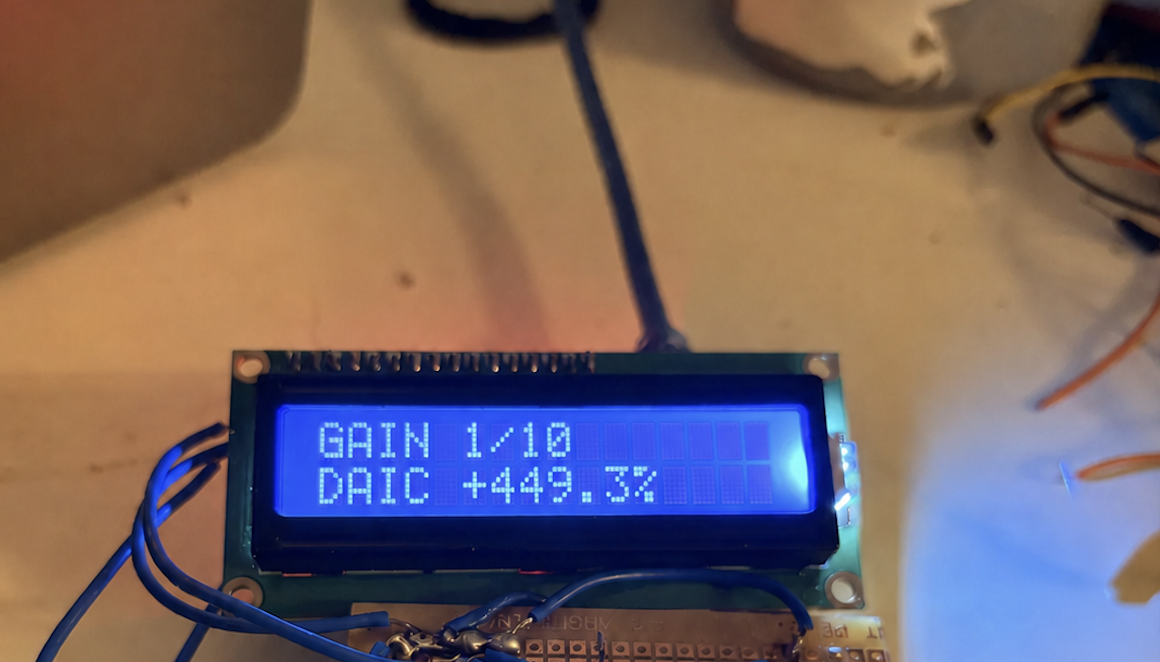
- The controller displays 20 rotating screens: GAIN 1/10 through GAIN 10/10, then LOSS 1/10 through LOSS 10/10.
- Data refreshes every five minutes, and cached records are resent every 15 seconds to keep the display reliable.
- This build creates a reusable mini Wi-Fi receiver that can later display almost any FMP endpoint.
Why Build A Dedicated Market Display
A brokerage app can show market movers in seconds. A standalone controller serves a different role: it offers a persistent, low-distraction view of the strongest daily percentage moves without needing to open a phone or browser.
It is also an accessible first financial-hardware project. The D1 Mini manages Wi-Fi and HTTPS requests, while the Uno manages the LCD. The two boards exchange compact text messages through the serial wiring.
Preliminary Setup: Getting Acquainted With The Hardware
What You Need
|
Component |
Purpose |
|
Arduino Uno |
Controls the LCD and receives formatted market records |
|
ESP8266 D1 Mini |
Connects to Wi-Fi and retrieves FMP data |
|
I²C 16×2 LCD |
Displays each stock symbol and percentage move |
|
1 kΩ and 2 kΩ resistors |
Form the existing Uno-to-D1 Mini voltage divider |
|
Regulated 5 V power supply |
Powers the Uno and D1 Mini |
Connecting The Modules: Arduino, I²C LCD and D1 Mini
|
Component |
Pin |
Arduino Uno |
|
I²C LCD |
VCC |
5V |
|
I²C LCD |
GND |
GND |
|
I²C LCD |
SDA |
A4 |
|
I²C LCD |
SCL |
A5 |
|
D1 Mini |
TX |
D2 |
|
D1 Mini |
G |
GND |
|
D1 Mini |
D5 with resistors 1 and 2 OM |
D3 |
|
D1 Mini |
5V |
5V |
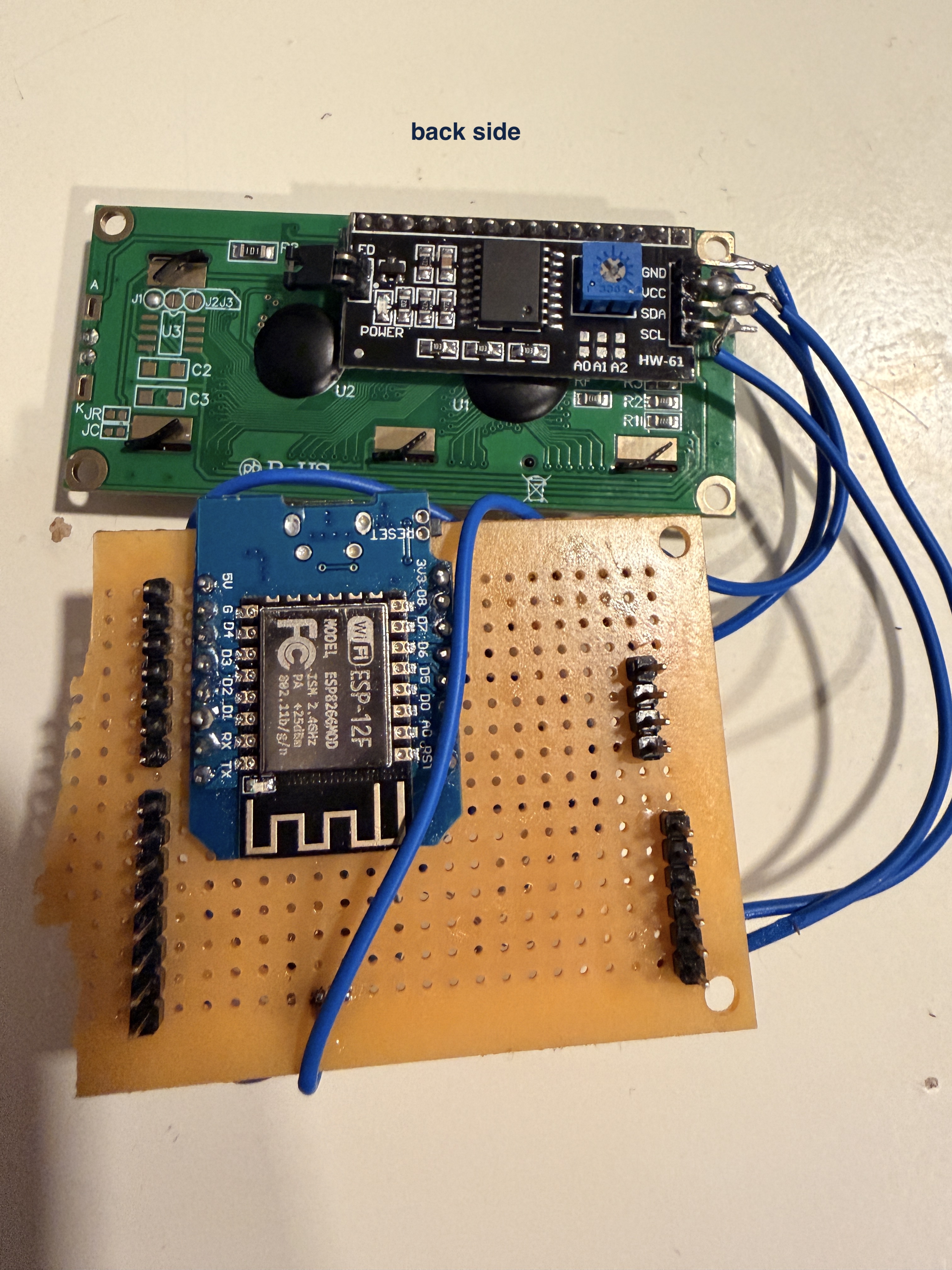
- LCD's VCC connected to 5V
- LCD's GND to GND
- LCD's SDA to Uno A4
- LCD's SCL to Uno A5.
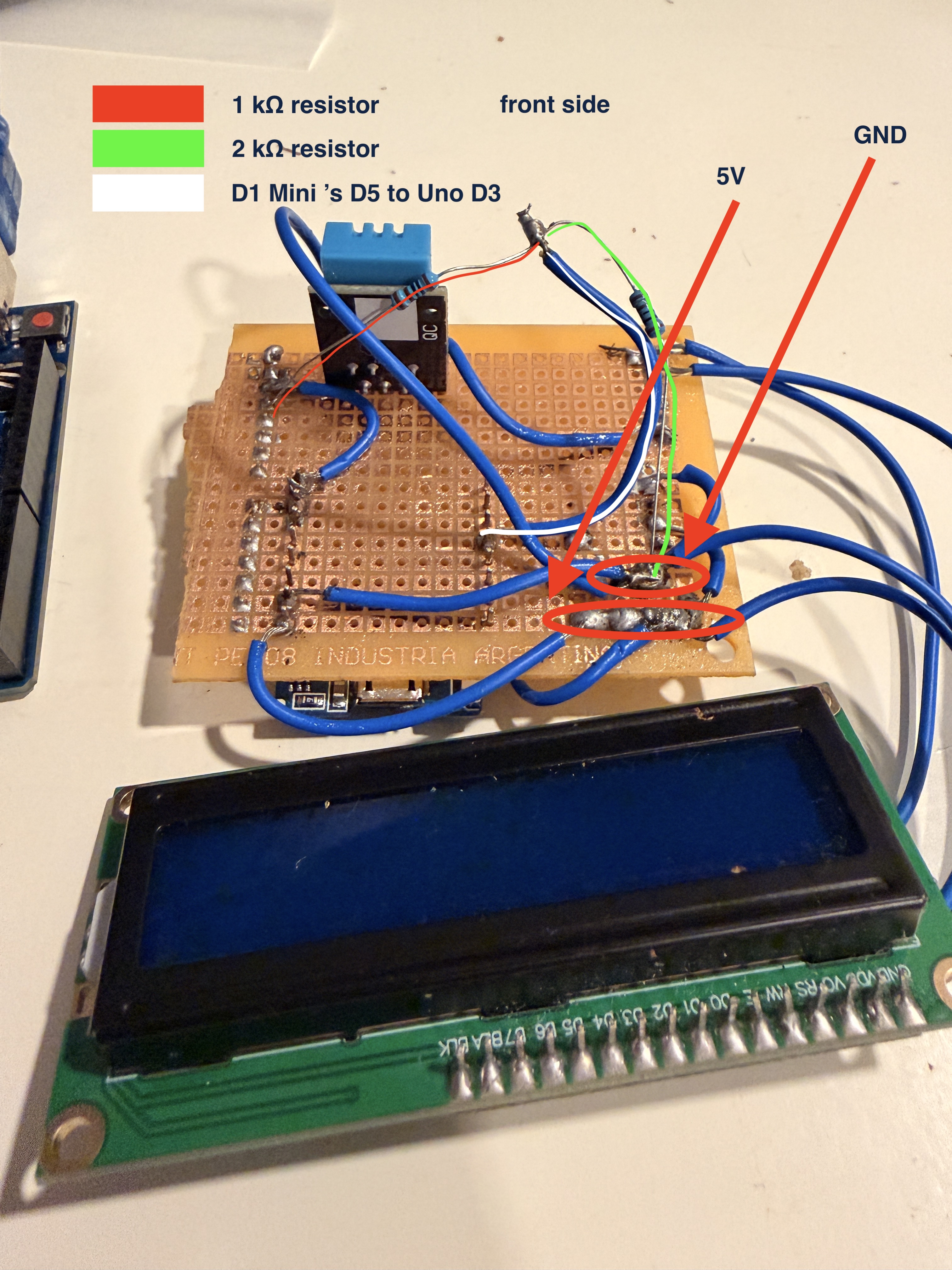
- D1 Mini TX should be connected to Uno D2 and connect both grounds (GND).
- Then connect Uno D3 through the existing voltage divider to D1 Mini D5.
Uno D3 goes through 1 kΩ to the junction; the junction connects to D1 Mini D5 and through 2 kΩ to ground. This reduces the Uno's 5V logic output to a safer level for the D1 Mini.
How The Controller Works
- The D1 Mini calls FMP's biggest-gainers and biggest-losers endpoints. It selects the first 10 records from each response and transmits a small record for every stock, such as M|G|1|DAIC|449.3 for a gainer or M|L|1|FLZH|-73.2 for a loser.
- The Uno saves the incoming records and changes its screen every four seconds. Each display screen contains a rank, symbol, and daily percentage move. This simple format suits a 16×2 LCD and avoids trying to squeeze 20 names onto one small display.
Turning the project into reality: uploading the code
- Download Arduino's IDE.
- Create an Arduino IDE sketch named market_movers_uno and paste in the Uno code (provided below).
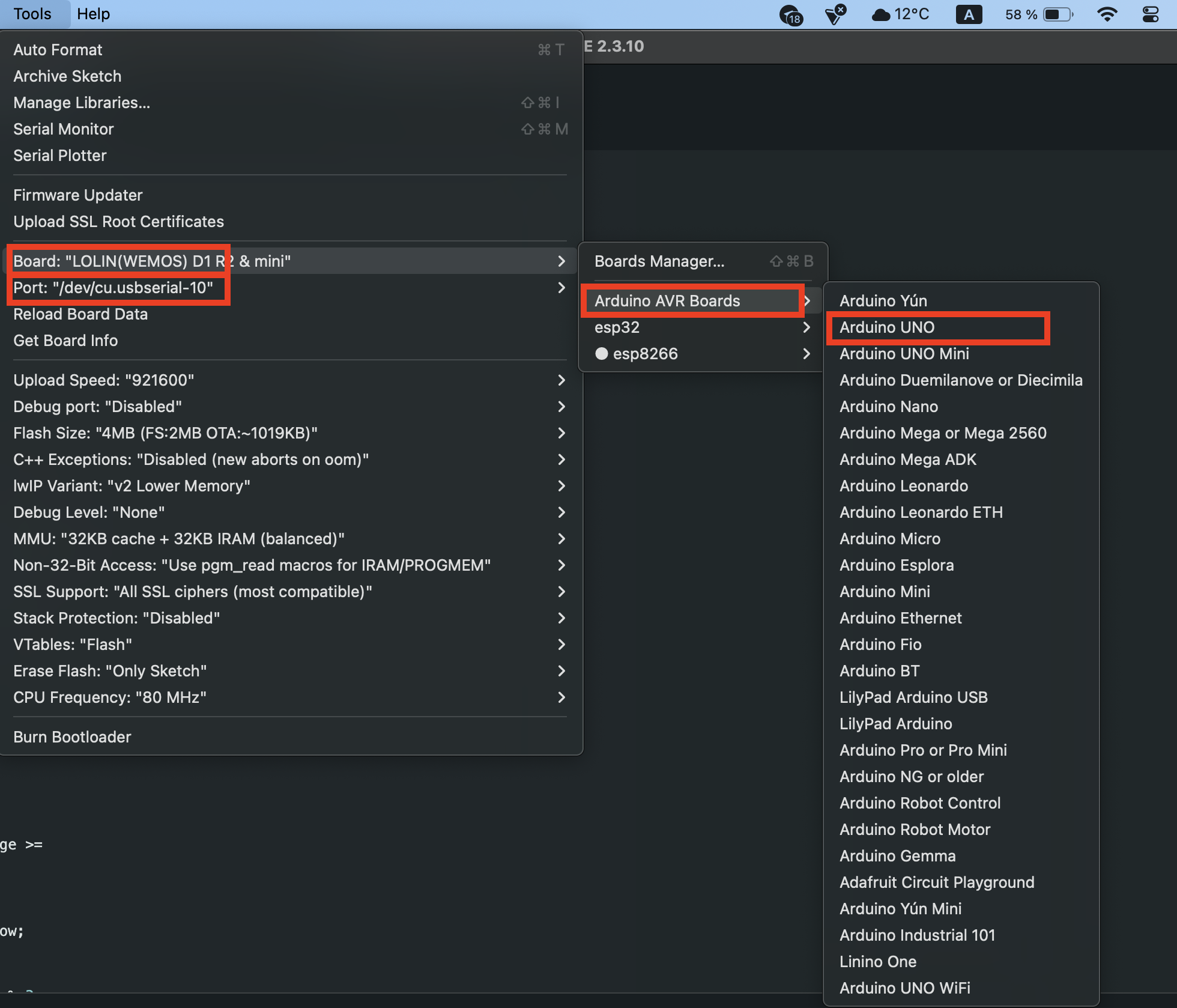
- In Arduino's IDE, go to Tools = > Select Arduino Uno (as shown in the below image), and choose the correct port
4. Upload the code.
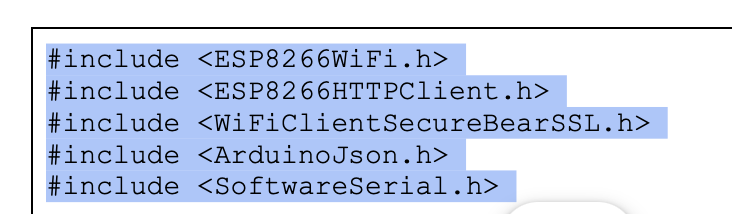
Add the below-listed libraries at the top of your code.

|
SoftwareSerial wifiSerial(2, 3); LiquidCrystal_I2C lcd(0x27, 16, 2); const unsigned long SCREEN_INTERVAL = 4000UL; const unsigned long REQUEST_INTERVAL = 5UL * 60UL * 1000UL; struct Mover { char symbol[9]; float percent; bool received; }; Mover gainers[10]; Mover losers[10]; byte screenNumber = 0; unsigned long lastScreenChange = 0; unsigned long lastRequest = 0; char wifiLine[48]; byte wifiLinePosition = 0; void printPadded(const char *text) { lcd.print(text); for (byte i = strlen(text); i < 16; i++) lcd.print(' '); } void showMover(const char *title, byte number, const Mover &mover) { char line[17]; lcd.clear(); lcd.setCursor(0, 0); snprintf(line, sizeof(line), "%s %u/10", title, number); printPadded(line); lcd.setCursor(0, 1); if (!mover.received) { printPadded("Loading..."); return; } char percent[10]; dtostrf(mover.percent, 0, 1, percent); snprintf(line, sizeof(line), "%s %s%%", mover.symbol, percent); printPadded(line); } void showScreen() { if (screenNumber < 10) showMover("GAIN", screenNumber + 1, gainers[screenNumber]); else showMover("LOSS", screenNumber - 9, losers[screenNumber - 10]); } void parseD1Message(char *line) { if (strncmp(line, "M|", 2) != 0) return; strtok(line, "|"); char *kind = strtok(NULL, "|"); char *numberText = strtok(NULL, "|"); char *symbol = strtok(NULL, "|"); char *percentText = strtok(NULL, "|"); if (!kind || !numberText || !symbol || !percentText) return; int number = atoi(numberText); if (number < 1 || number > 10) return; Mover *target = kind[0] == 'G' ? &gainers[number - 1] : kind[0] == 'L' ? &losers[number - 1] : NULL; if (!target) return; strncpy(target->symbol, symbol, sizeof(target->symbol) - 1); target->symbol[sizeof(target->symbol) - 1] = '\0'; target->percent = atof(percentText); target->received = true; } void receiveFromD1() { while (wifiSerial.available()) { char incoming = wifiSerial.read(); if (incoming == '\r') continue; if (incoming == '\n') { wifiLine[wifiLinePosition] = '\0'; parseD1Message(wifiLine); wifiLinePosition = 0; } else if (wifiLinePosition < sizeof(wifiLine) - 1) wifiLine[wifiLinePosition++] = incoming; else wifiLinePosition = 0; } } void requestMovers() { wifiSerial.println("REQUEST|MOVERS"); } void setup() { wifiSerial.begin(9600); lcd.init(); lcd.backlight(); lcd.setCursor(0, 0); printPadded("Market Movers"); lcd.setCursor(0, 1); printPadded("Starting..."); delay(1500); requestMovers(); showScreen(); lastScreenChange = lastRequest = millis(); } void loop() { unsigned long now = millis(); receiveFromD1(); if (now - lastRequest >= REQUEST_INTERVAL) { lastRequest = now; requestMovers(); } if (now - lastScreenChange >= SCREEN_INTERVAL) { lastScreenChange = now; screenNumber = (screenNumber + 1) % 20; showScreen(); } } |
5. In Arduino IDE, create another sketch named market_movers_d1_mini and paste in the D1 Mini code.
Add the below-listed libraries at the top of your code.
|
// Replace these three placeholders with your own Wi-Fi and FMP API credentials. const char *WIFI_SSID = "YOUR_WIFI_NAME"; const char *WIFI_PASSWORD = "YOUR_WIFI_PASSWORD"; const char *FMP_API_KEY = "YOUR_FMP_API_KEY"; SoftwareSerial unoSerial(D5, D6); const unsigned long REFRESH_INTERVAL = 5UL * 60UL * 1000UL; const unsigned long RESEND_INTERVAL = 15000UL; const unsigned long WIFI_RETRY_INTERVAL = 10000UL; struct Mover { char symbol[9]; float percent; bool valid; }; Mover gainers[10], losers[10]; bool haveMovers = false; unsigned long lastRefresh = 0, lastResend = 0, lastWifiAttempt = 0; String unoLine; void connectWiFi() { if (WiFi.status() == WL_CONNECTED) return; WiFi.mode(WIFI_STA); WiFi.begin(WIFI_SSID, WIFI_PASSWORD); unsigned long started = millis(); while (WiFi.status() != WL_CONNECTED && millis() - started < 15000UL) { readUno(); delay(250); } } bool fetchList(const char *endpoint, Mover target[]) { BearSSL::WiFiClientSecure client; client.setInsecure(); HTTPClient https; String url = String("https://financialmodelingprep.com/stable/") + endpoint + "?apikey=" + FMP_API_KEY; if (!https.begin(client, url)) return false; int code = https.GET(); if (code != HTTP_CODE_OK) { https.end(); return false; } DynamicJsonDocument doc(11000); DeserializationError error = deserializeJson(doc, https.getStream()); https.end(); if (error || !doc.is JsonArray data = doc.as for (byte i = 0; i < 10; i++) { const char *symbol = data[i]["symbol"] | "---"; strncpy(target[i].symbol, symbol, sizeof(target[i].symbol) - 1); target[i].symbol[sizeof(target[i].symbol) - 1] = '\0'; target[i].percent = data[i]["changesPercentage"] | 0.0; target[i].valid = true; } return true; } void sendMoversToUno() { if (!haveMovers) return; for (byte i = 0; i < 10; i++) { Serial.print("M|G|"); Serial.print(i + 1); Serial.print('|'); Serial.print(gainers[i].symbol); Serial.print('|'); Serial.println(gainers[i].percent, 1); delay(25); } for (byte i = 0; i < 10; i++) { Serial.print("M|L|"); Serial.print(i + 1); Serial.print('|'); Serial.print(losers[i].symbol); Serial.print('|'); Serial.println(losers[i].percent, 1); delay(25); } } void refreshMovers() { if (WiFi.status() != WL_CONNECTED) return; bool gainersOk = fetchList("biggest-gainers", gainers); bool losersOk = fetchList("biggest-losers", losers); if (gainersOk && losersOk) { haveMovers = true; sendMoversToUno(); lastResend = millis(); } } void readUno() { while (unoSerial.available()) { char character = unoSerial.read(); if (character == '\r') continue; if (character == '\n') { if (unoLine == "REQUEST|MOVERS") refreshMovers(); unoLine = ""; } else { unoLine += character; if (unoLine.length() > 40) unoLine = ""; } } } void setup() { Serial.begin(9600); // Hardware TX sends records to Uno D2. unoSerial.begin(9600); delay(500); connectWiFi(); refreshMovers(); lastRefresh = millis(); } void loop() { unsigned long now = millis(); readUno(); if (WiFi.status() != WL_CONNECTED && now - lastWifiAttempt >= WIFI_RETRY_INTERVAL) { lastWifiAttempt = now; connectWiFi(); } if (WiFi.status() == WL_CONNECTED && now - lastRefresh >= REFRESH_INTERVAL) { lastRefresh = now; refreshMovers(); } if (haveMovers && now - lastResend >= RESEND_INTERVAL) { lastResend = now; sendMoversToUno(); } } |
6. Replace YOUR_WIFI_NAME, YOUR_WIFI_PASSWORD, and YOUR_FMP_API_KEY with your own values.
7. In Tools => Boards = > EPS8266 => Select LOLIN(WEMOS) D1 R2 & mini before uploading.
8. Temporarily disconnect the Uno D3-to-D1 D5 signal wire during D1 Mini uploads, then reconnect it afterwards.
9. Install ArduinoJson by Benoit Blanchon from Arduino IDE's Library Manager.
Expand Your Mini Wi-Fi Receiver
This controller is now a reusable mini Wi-Fi receiver for financial information. The D1 Mini downloads structured data, converts it to short serial messages, and the Uno presents it on the LCD. You can use the same pattern with other FMP endpoints but for fetching individual stock info, you need to connect a keyboard.
For example, you could replace the two movers requests with an earnings calendar, stock quotes for a personal watchlist, analyst upgrades and downgrades, cryptocurrency prices.
The Uno screen has limited space, so keep each record concise. Symbols, prices, percentage changes, earnings dates, rating changes, and short headlines work especially well. More complex data can rotate across several screens, just as the gainers and losers list does.
Important Limits
This controller is an information display, not a trading system or investment recommendation. Large percentage changes can reflect low share prices, limited liquidity, corporate actions, or news that requires further verification.
The device uses the first 10 records returned by each endpoint. You can later add rules for exchange, price, volume, or minimum market capitalization if you want a more selective display.
FAQ
Does This Device Need A Computer To Run?
No. After you upload both sketches and connect a stable power supply (I recommend using a 5V phone charger, plugged into Uno's USB - B ), the Uno and D1 Mini run independently. The D1 Mini needs access to your 2.4 GHz Wi-Fi network to download updated FMP data.
How Often Does The Market Data Update?
The D1 Mini requests fresh gainers and losers data every five minutes. It also sends its most recently downloaded list to the Uno every 15 seconds, helping the LCD recover if the boards power on at slightly different times.
Why Does The LCD Show One Stock At A Time?
A 16×2 LCD has limited room, so the controller rotates through one ranked stock per screen. This makes the ticker and percentage move readable while still covering all 20 records. You can connect a bigger screen to see the complete list of gainers/losers.
Can I Show My Own Watchlist Instead?
Yes. Replace the biggest-gainers and biggest-losers requests in the D1 Mini code with FMP's quote endpoint or another endpoint that returns your selected symbols (But you need to connect a keyboard for that, and program Arduino accordingly). Keep the messages short so the Uno can display them clearly.
Can I Add Other FMP Data Later?
Yes. The D1 Mini now acts as a compact Wi-Fi receiver for structured financial data. You can adapt it to show earnings dates, analyst actions, crypto prices, company news, or other FMP endpoint results by changing the D1 Mini request and display-message format.

Treasury, trading, liquidity, and equity analysis for investors
Sanzhi writes for FMP with a focus on equity analysis, valuation, market data, and practical investment decision-making. He has worked across financial institutions in treasury, trading, and liquidity roles, bringing hands-on experience in investment analysis, market execution, risk, and strategy. His work focuses on helping readers interpret financial data with clarity, discipline, and an institutional market perspective.
Related



Financial data for every need
Real-time quotes and 30+ years of historical data, including prices, fundamentals, and insider transactions — all accessible via API.
Create Free Account